Glunova App: Glucose Track App
Category
Case Study
Category
Case Study
Category
Case Study
Industry
Health
Industry
Health
Industry
Health
Date
Jun 3, 2025
Date
Jun 3, 2025
Date
Jun 3, 2025
Team
Solo
Team
Solo
Team
Solo
Project Overview
Project Overview
Project Overview
A Friendly App for Smarter Health Tracking
Glunova is a mobile health app designed to help people track their blood sugar and daily habits in a way that feels simple, warm, and approachable. Built with users of all ages in mind — from teens to seniors — the app makes it easy to log glucose, meals, medications, and activities in just a few taps.
Unlike many health apps that feel too clinical or complex, Glunova uses a soft visual identity, intuitive navigation, and thoughtful features like reminders and insights to support users in building healthier routines. Whether you're managing diabetes or simply trying to stay on track, Glunova is your everyday companion for better wellness — anytime, anywhere.
Problem & Solution
Problem
In an age where everything is fast and accessible, many people — from teenagers to the elderly — often neglect their health, especially when it comes to diet and lifestyle. Excessive consumption of unhealthy food, lack of routine checkups, and poor medication adherence contribute to a rise in blood sugar-related conditions, such as diabetes. In countries like Indonesia, this issue has become increasingly common, even among younger populations. However, existing health apps often feel overly clinical or complex, making them intimidating or difficult for everyday users to adopt consistently.
Solution
To make health tracking more approachable, I designed Glunova, a mobile app focused on simplifying blood sugar monitoring and daily habit tracking. The app features a clean and friendly interface that allows users to log their glucose levels, food intake, medications, and physical activities easily. With soft visuals, clear reminders, and accessible insights, Glunova supports users of all ages in maintaining healthier routines and making better daily choices — all without feeling overwhelmed.
Glunova turns health tracking into a habit that feels human, simple, and supportive.
🎯 Project Goals
Glunova aims to make health tracking feel simple, friendly, and supportive — especially for people managing their blood sugar levels. The app focuses on creating a smooth and easy logging experience, helping users of all ages track glucose, food, meds, and activity without feeling overwhelmed. With a warm visual style and helpful reminders, Glunova encourages healthy habits in a way that feels natural and human.
A Friendly App for Smarter Health Tracking
Glunova is a mobile health app designed to help people track their blood sugar and daily habits in a way that feels simple, warm, and approachable. Built with users of all ages in mind — from teens to seniors — the app makes it easy to log glucose, meals, medications, and activities in just a few taps.
Unlike many health apps that feel too clinical or complex, Glunova uses a soft visual identity, intuitive navigation, and thoughtful features like reminders and insights to support users in building healthier routines. Whether you're managing diabetes or simply trying to stay on track, Glunova is your everyday companion for better wellness — anytime, anywhere.
Problem & Solution
Problem
In an age where everything is fast and accessible, many people — from teenagers to the elderly — often neglect their health, especially when it comes to diet and lifestyle. Excessive consumption of unhealthy food, lack of routine checkups, and poor medication adherence contribute to a rise in blood sugar-related conditions, such as diabetes. In countries like Indonesia, this issue has become increasingly common, even among younger populations. However, existing health apps often feel overly clinical or complex, making them intimidating or difficult for everyday users to adopt consistently.
Solution
To make health tracking more approachable, I designed Glunova, a mobile app focused on simplifying blood sugar monitoring and daily habit tracking. The app features a clean and friendly interface that allows users to log their glucose levels, food intake, medications, and physical activities easily. With soft visuals, clear reminders, and accessible insights, Glunova supports users of all ages in maintaining healthier routines and making better daily choices — all without feeling overwhelmed.
Glunova turns health tracking into a habit that feels human, simple, and supportive.
🎯 Project Goals
Glunova aims to make health tracking feel simple, friendly, and supportive — especially for people managing their blood sugar levels. The app focuses on creating a smooth and easy logging experience, helping users of all ages track glucose, food, meds, and activity without feeling overwhelmed. With a warm visual style and helpful reminders, Glunova encourages healthy habits in a way that feels natural and human.
A Friendly App for Smarter Health Tracking
Glunova is a mobile health app designed to help people track their blood sugar and daily habits in a way that feels simple, warm, and approachable. Built with users of all ages in mind — from teens to seniors — the app makes it easy to log glucose, meals, medications, and activities in just a few taps.
Unlike many health apps that feel too clinical or complex, Glunova uses a soft visual identity, intuitive navigation, and thoughtful features like reminders and insights to support users in building healthier routines. Whether you're managing diabetes or simply trying to stay on track, Glunova is your everyday companion for better wellness — anytime, anywhere.
Problem & Solution
Problem
In an age where everything is fast and accessible, many people — from teenagers to the elderly — often neglect their health, especially when it comes to diet and lifestyle. Excessive consumption of unhealthy food, lack of routine checkups, and poor medication adherence contribute to a rise in blood sugar-related conditions, such as diabetes. In countries like Indonesia, this issue has become increasingly common, even among younger populations. However, existing health apps often feel overly clinical or complex, making them intimidating or difficult for everyday users to adopt consistently.
Solution
To make health tracking more approachable, I designed Glunova, a mobile app focused on simplifying blood sugar monitoring and daily habit tracking. The app features a clean and friendly interface that allows users to log their glucose levels, food intake, medications, and physical activities easily. With soft visuals, clear reminders, and accessible insights, Glunova supports users of all ages in maintaining healthier routines and making better daily choices — all without feeling overwhelmed.
Glunova turns health tracking into a habit that feels human, simple, and supportive.
🎯 Project Goals
Glunova aims to make health tracking feel simple, friendly, and supportive — especially for people managing their blood sugar levels. The app focuses on creating a smooth and easy logging experience, helping users of all ages track glucose, food, meds, and activity without feeling overwhelmed. With a warm visual style and helpful reminders, Glunova encourages healthy habits in a way that feels natural and human.
Design Process
Design Process
Design Process
Competitor Analysis
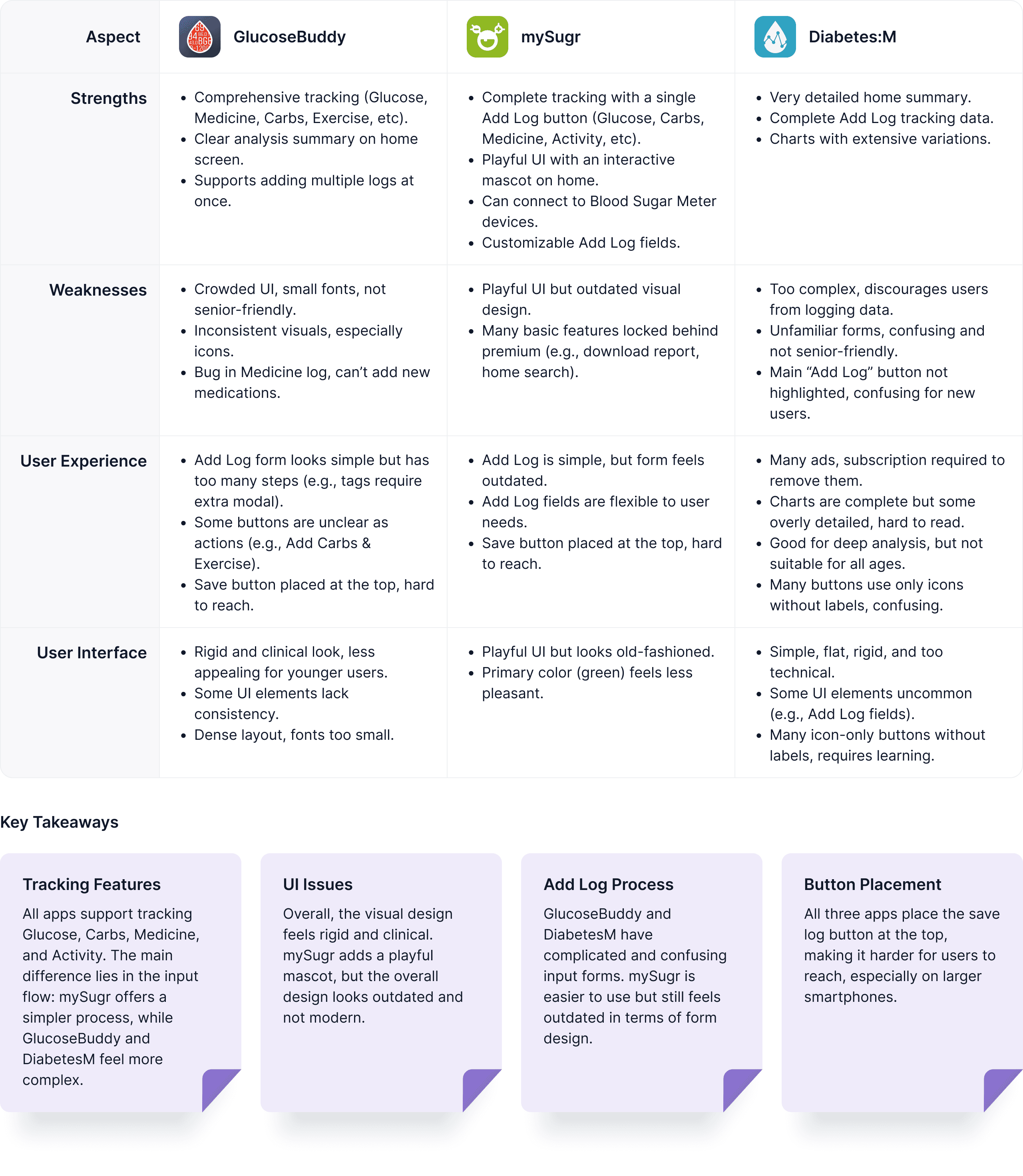
I conducted research on several blood glucose tracking applications by analyzing their strengths and weaknesses across multiple aspects: overall functionality, user experience, and user interface (visual design). The goal of this analysis is to identify key insights that will help define Glunova’s positioning, enabling it to deliver a more relevant, user-friendly, and visually engaging experience for its users.
Quantitative Insight
I conducted a survey using Google Forms and collected responses from several users. The data gathered was then analyzed and summarized into quantitative insights as follows.
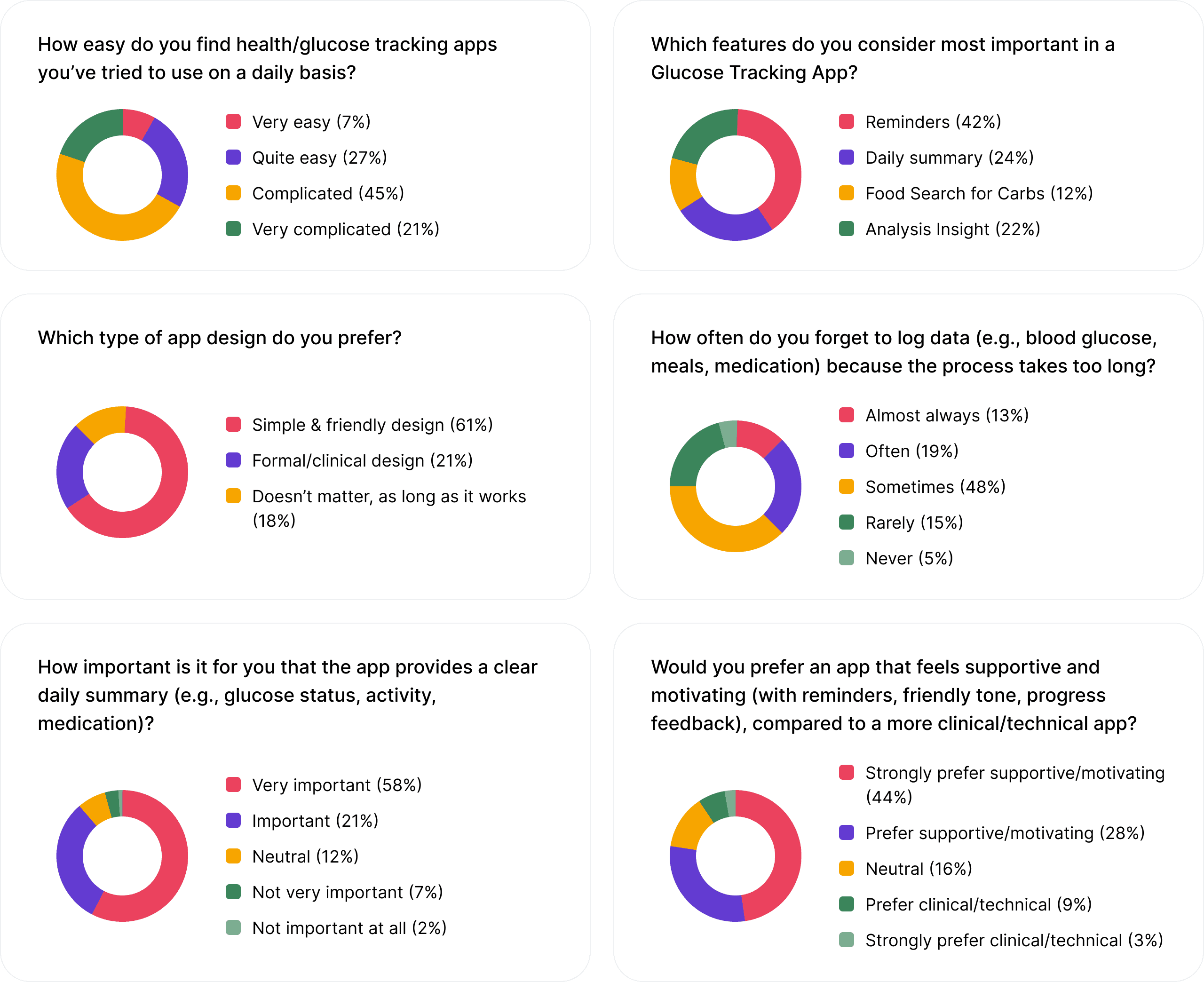
From the data above, get a summary:
Ease of Use → 66% find apps complicated.
Key Features → Reminders (42%) & Daily Summary (24%) are top priorities.
Design Preference → 61% prefer simple & friendly design.
Logging Habit → 67% often/sometimes forget to log due to long process.
Daily Summary → 79% consider it very important.
App Tone → 72% prefer supportive & motivating tone over clinical.
Key Takeaways:
Apps are still perceived as complicated, process simplification needed.
Reminders & clear daily summary are the most essential features.
Users strongly prefer a simple, friendly design with a supportive tone rather than clinical.
Qualitative Insight
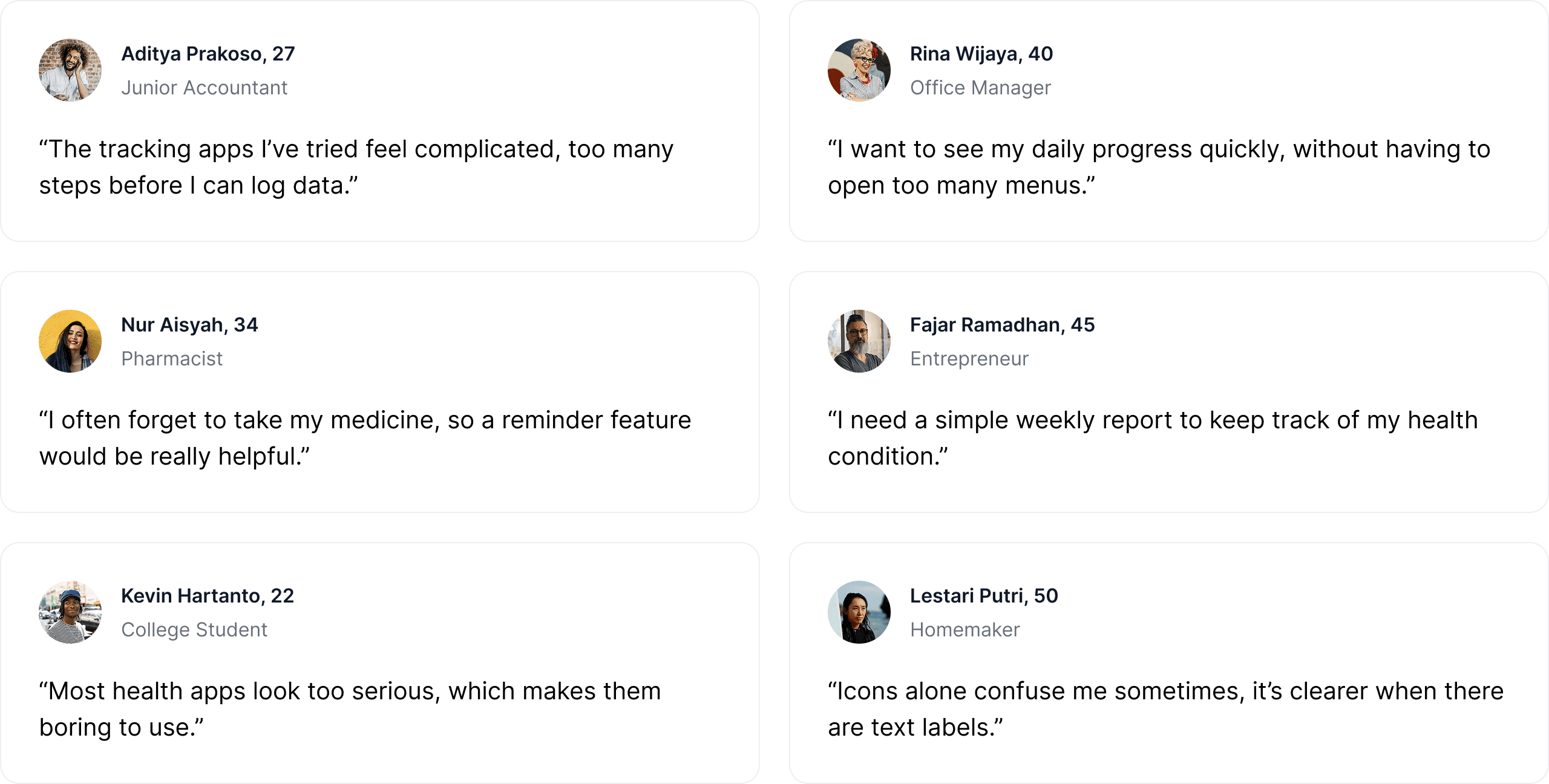
Through interviews with several users, I explored their habits and motivations. These insights guided me in improving the user experience of Glunova.
Below are some common statements and key takeaways mentioned by users during the interviews.
User Personas
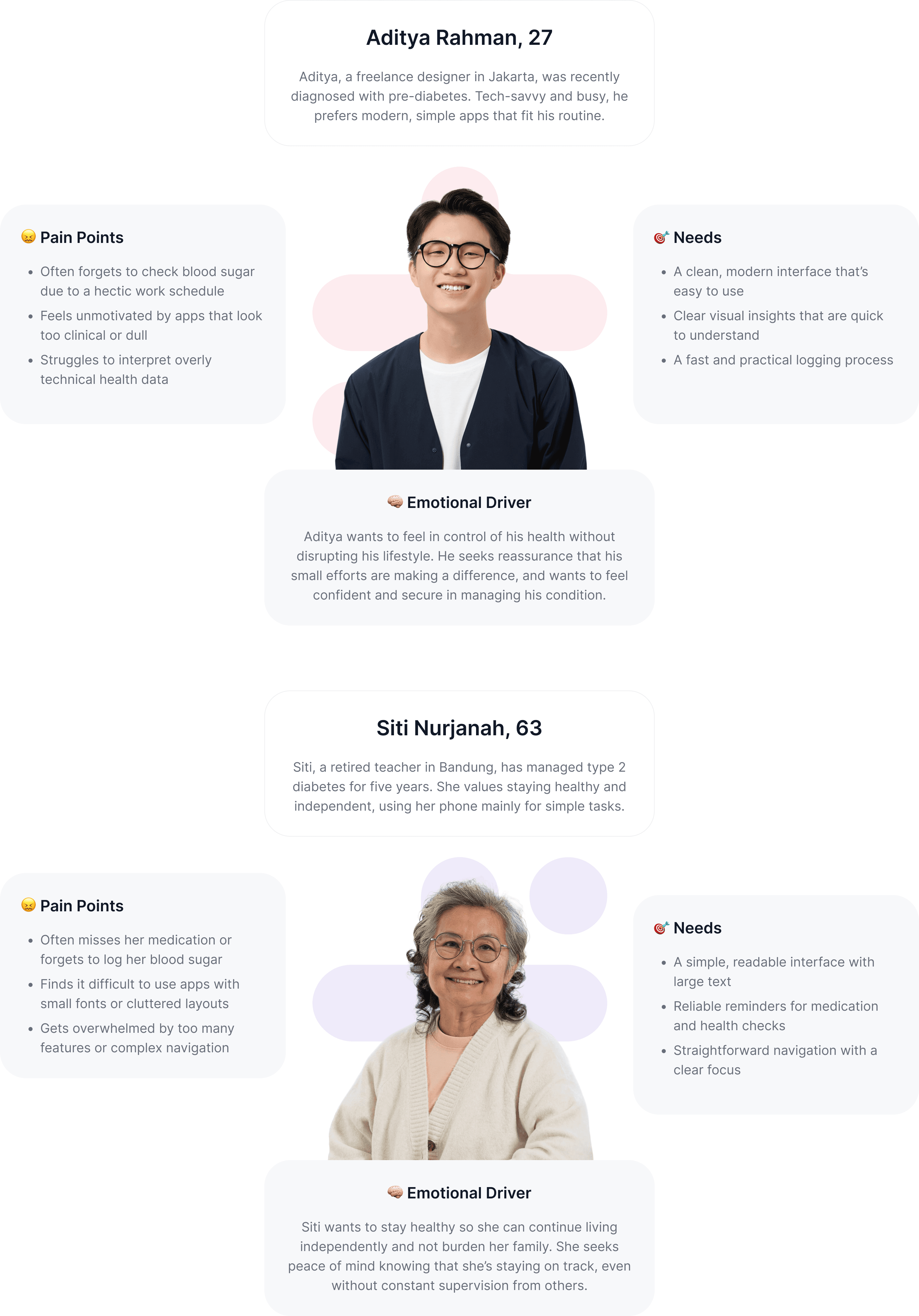
To create a solution that truly helps, I first sought to understand who I was designing for. These user personas represent two core groups — young adults managing early signs of diabetes, and older users who need a simple yet supportive tool to stay on track. By identifying their daily habits, struggles, and emotional needs, I was able to shape Glunova into an app that feels helpful, friendly, and approachable for both.
User Empathy
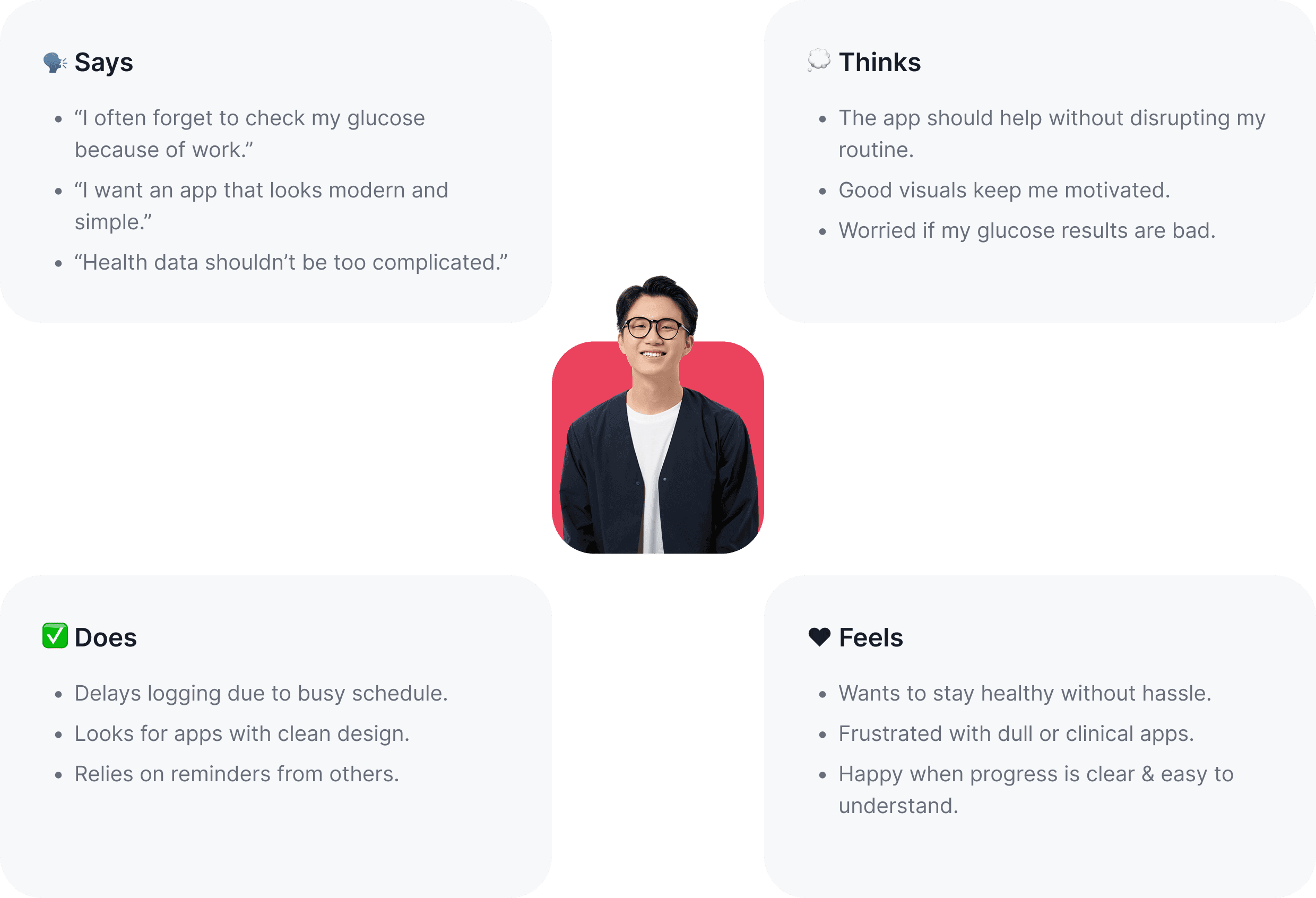
Deeply understand users’ needs, motivations, and challenges. By exploring what they say, think, do, and feel, we gain a holistic perspective of their experiences. This understanding serves as the foundation for designing solutions that are not only functional and easy to use but also emotionally meaningful for Glunova’s users.
User Main Flow
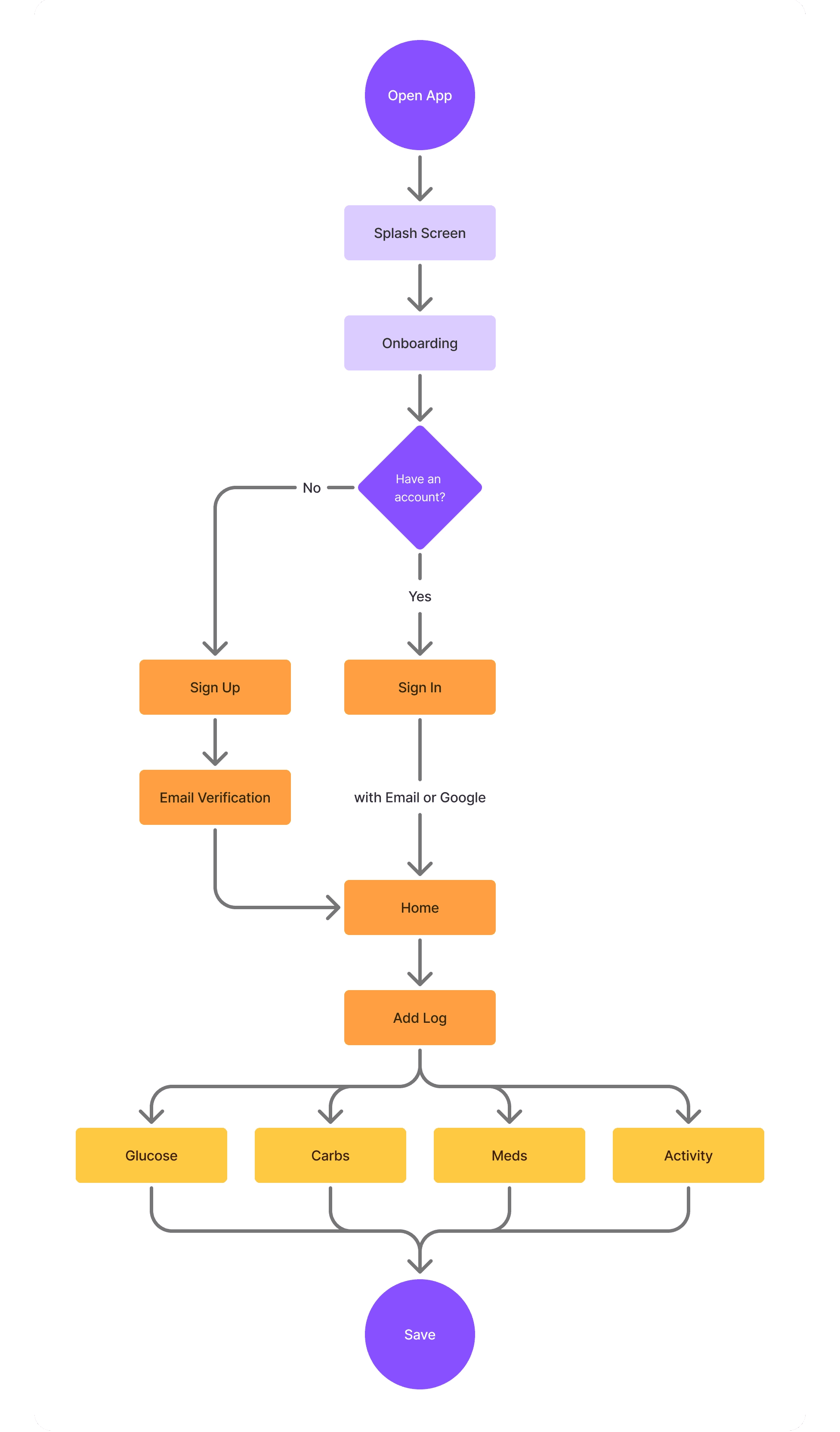
This is the Main Flow I designed to help users add Health Logs, from glucose checks to daily activities. The flow is kept as simple as possible so it’s easy to understand and use for everyone.
Information Architecture
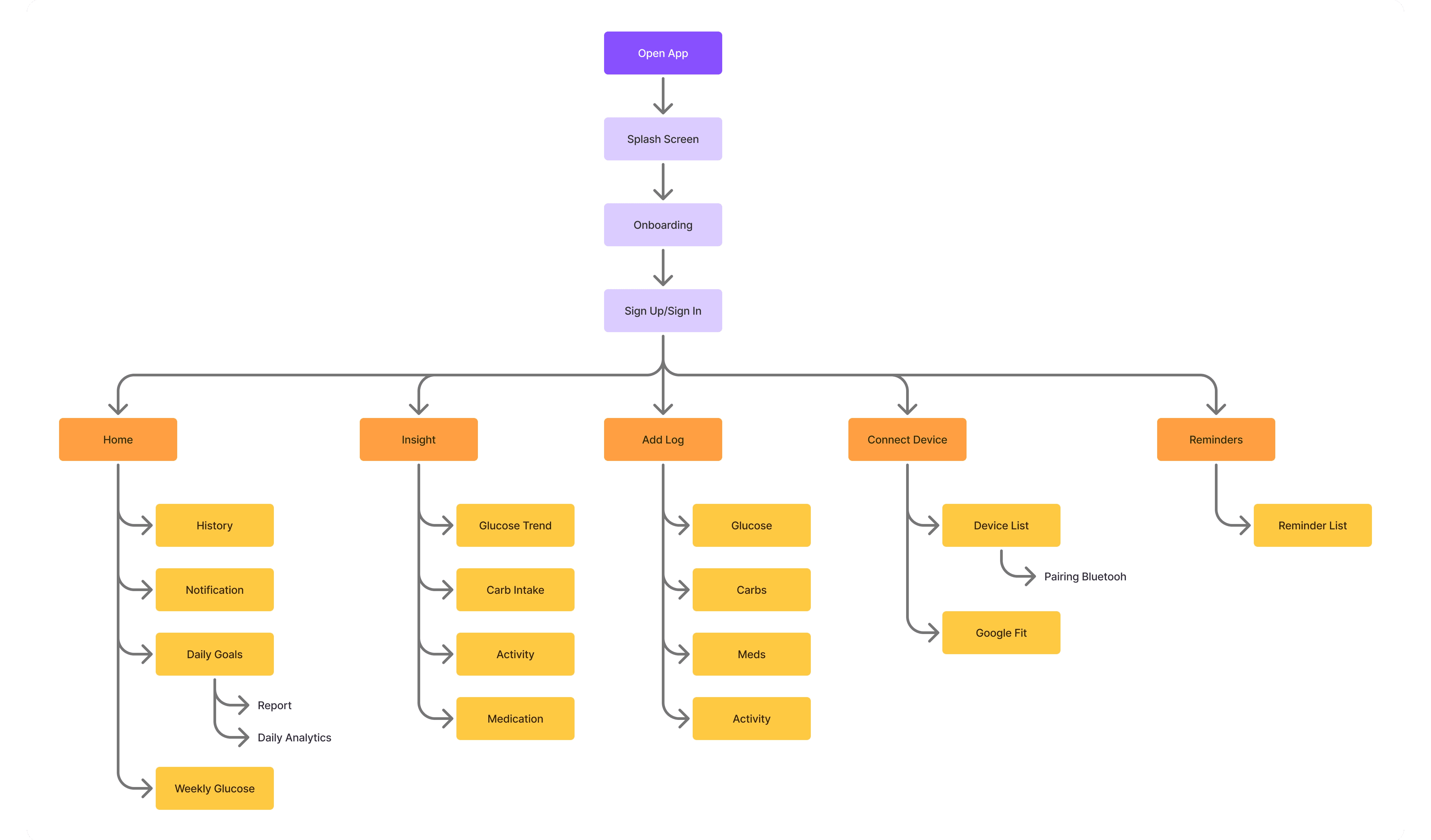
Focuses on how the structure and navigation flow of the app are organized. By arranging the hierarchy of content and features clearly, users can easily find the information they need without confusion. A well-designed information architecture ensures an efficient and intuitive experience, while supporting users’ primary goals when using Glunova.
Wireframing (low fidelity)
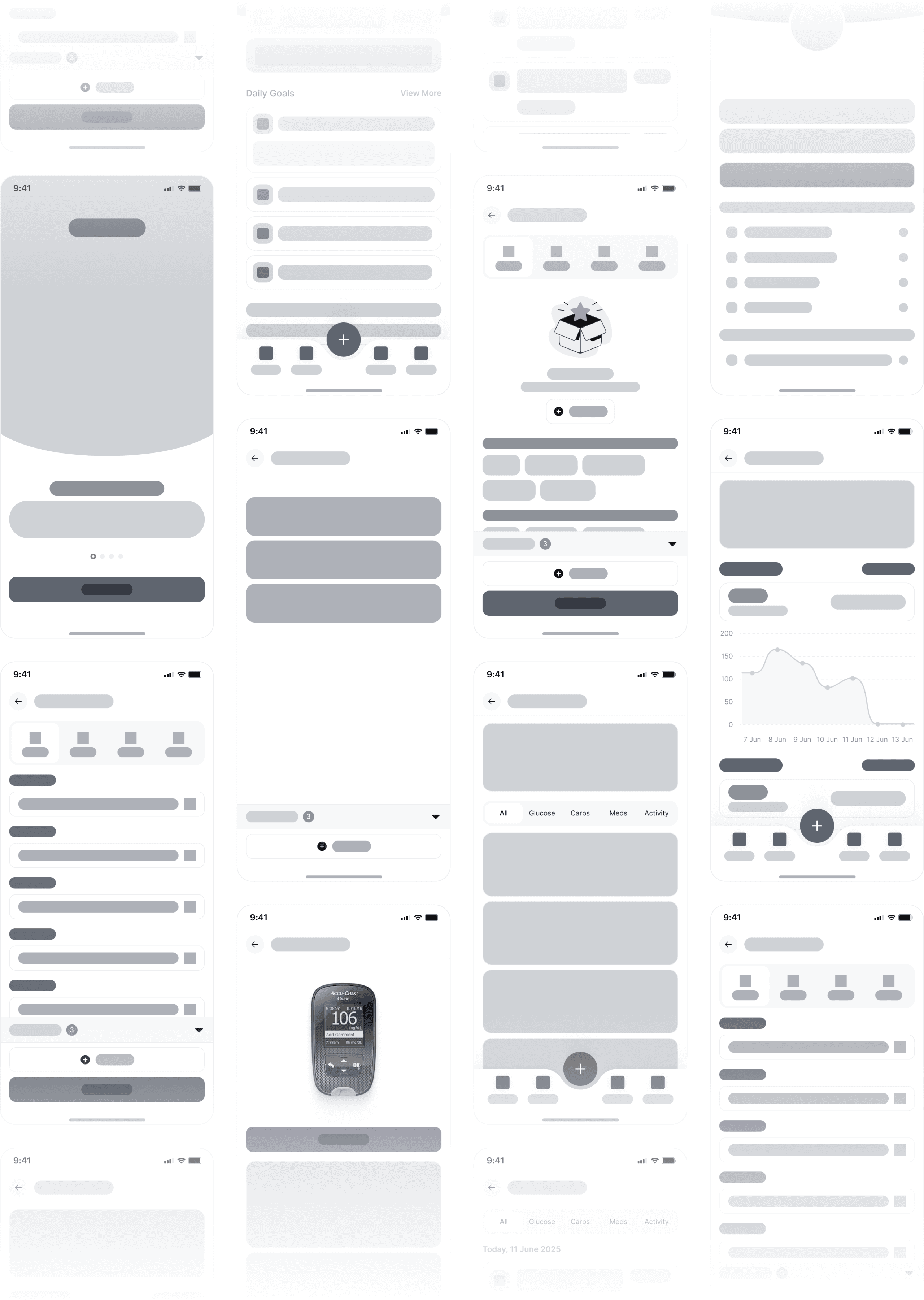
showcases the initial framework of the Glunova app in the form of simple sketches. Wireframes are used to map out layout, content structure, and key interaction flows without the distraction of visual design elements. The goal of this stage is to ensure navigation and core functions are clear and easy to understand before moving on to more detailed visual design.
Style Guide
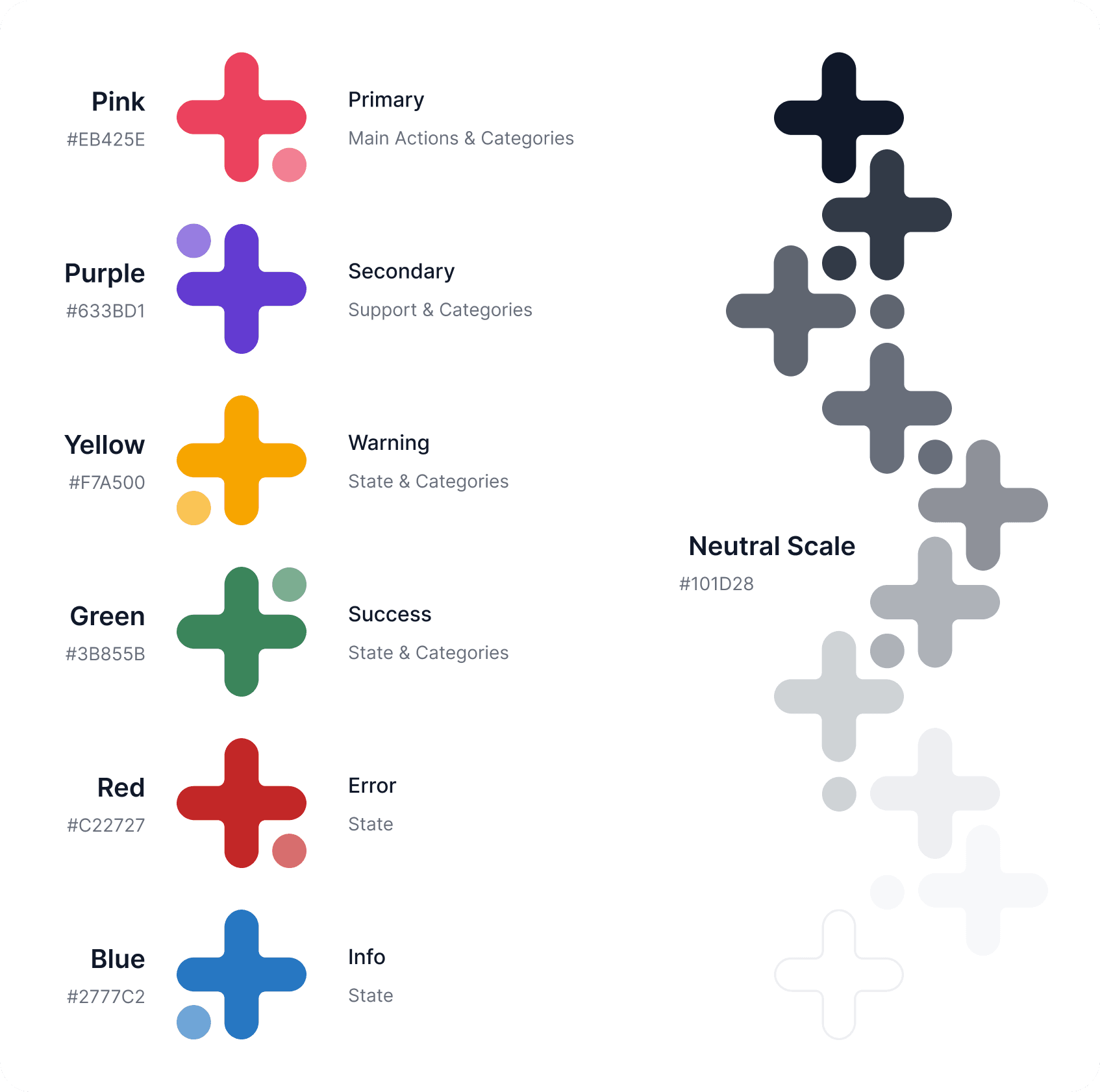
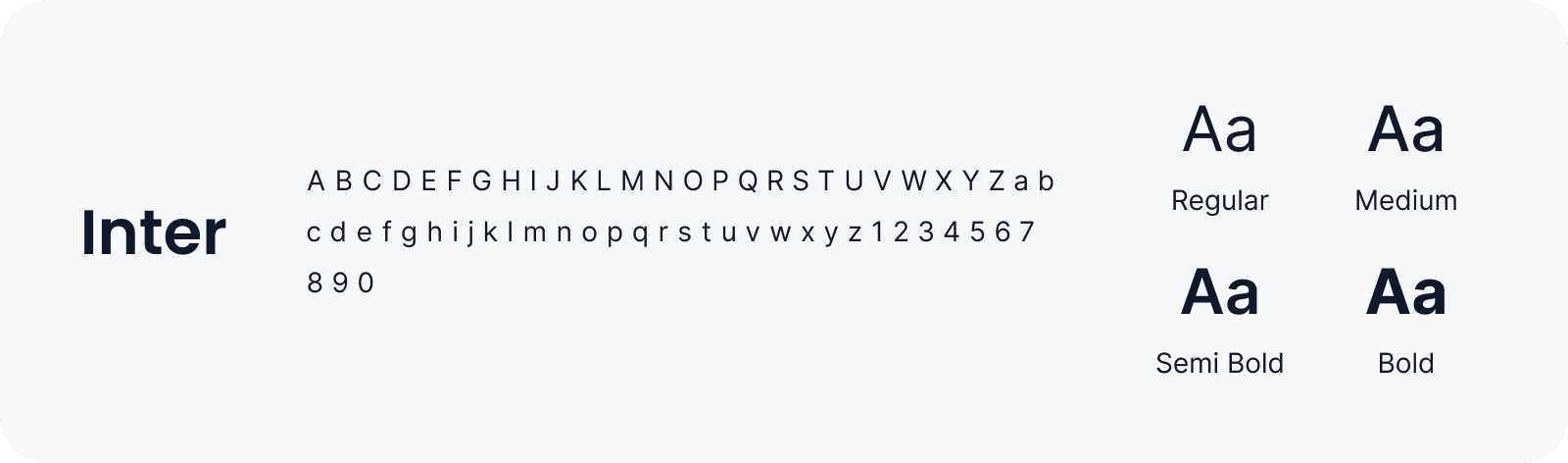
Glunova adopts a bright and approachable visual style to create a warm, friendly experience for users of all ages. The color palette and typography are carefully selected to support clarity, comfort, and consistency throughout the interface — making health tracking feel simple and engaging.
UI Kit
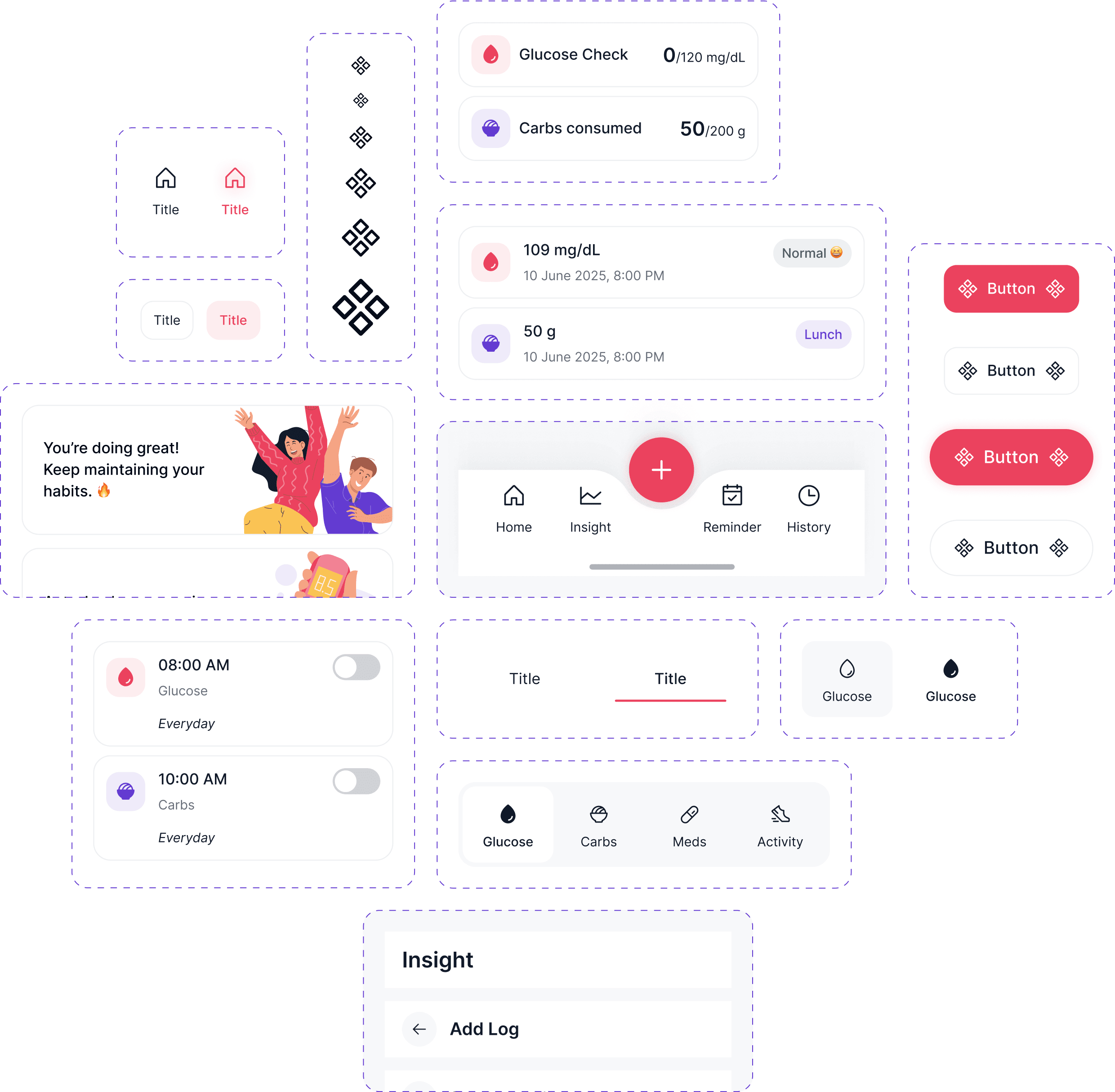
The UI Kit defines the essential building blocks of the app — from buttons and form fields to icons and cards. It ensures consistency, speeds up the design process, and maintains a unified visual language across all screens.
Competitor Analysis
I conducted research on several blood glucose tracking applications by analyzing their strengths and weaknesses across multiple aspects: overall functionality, user experience, and user interface (visual design). The goal of this analysis is to identify key insights that will help define Glunova’s positioning, enabling it to deliver a more relevant, user-friendly, and visually engaging experience for its users.
Quantitative Insight
I conducted a survey using Google Forms and collected responses from several users. The data gathered was then analyzed and summarized into quantitative insights as follows.
From the data above, get a summary:
Ease of Use → 66% find apps complicated.
Key Features → Reminders (42%) & Daily Summary (24%) are top priorities.
Design Preference → 61% prefer simple & friendly design.
Logging Habit → 67% often/sometimes forget to log due to long process.
Daily Summary → 79% consider it very important.
App Tone → 72% prefer supportive & motivating tone over clinical.
Key Takeaways:
Apps are still perceived as complicated, process simplification needed.
Reminders & clear daily summary are the most essential features.
Users strongly prefer a simple, friendly design with a supportive tone rather than clinical.
Qualitative Insight
Through interviews with several users, I explored their habits and motivations. These insights guided me in improving the user experience of Glunova.
Below are some common statements and key takeaways mentioned by users during the interviews.
User Personas
To create a solution that truly helps, I first sought to understand who I was designing for. These user personas represent two core groups — young adults managing early signs of diabetes, and older users who need a simple yet supportive tool to stay on track. By identifying their daily habits, struggles, and emotional needs, I was able to shape Glunova into an app that feels helpful, friendly, and approachable for both.
User Empathy
Deeply understand users’ needs, motivations, and challenges. By exploring what they say, think, do, and feel, we gain a holistic perspective of their experiences. This understanding serves as the foundation for designing solutions that are not only functional and easy to use but also emotionally meaningful for Glunova’s users.
User Main Flow
This is the Main Flow I designed to help users add Health Logs, from glucose checks to daily activities. The flow is kept as simple as possible so it’s easy to understand and use for everyone.
Information Architecture
Focuses on how the structure and navigation flow of the app are organized. By arranging the hierarchy of content and features clearly, users can easily find the information they need without confusion. A well-designed information architecture ensures an efficient and intuitive experience, while supporting users’ primary goals when using Glunova.
Wireframing (low fidelity)
showcases the initial framework of the Glunova app in the form of simple sketches. Wireframes are used to map out layout, content structure, and key interaction flows without the distraction of visual design elements. The goal of this stage is to ensure navigation and core functions are clear and easy to understand before moving on to more detailed visual design.
Style Guide
Glunova adopts a bright and approachable visual style to create a warm, friendly experience for users of all ages. The color palette and typography are carefully selected to support clarity, comfort, and consistency throughout the interface — making health tracking feel simple and engaging.
UI Kit
The UI Kit defines the essential building blocks of the app — from buttons and form fields to icons and cards. It ensures consistency, speeds up the design process, and maintains a unified visual language across all screens.
Competitor Analysis
I conducted research on several blood glucose tracking applications by analyzing their strengths and weaknesses across multiple aspects: overall functionality, user experience, and user interface (visual design). The goal of this analysis is to identify key insights that will help define Glunova’s positioning, enabling it to deliver a more relevant, user-friendly, and visually engaging experience for its users.
Quantitative Insight
I conducted a survey using Google Forms and collected responses from several users. The data gathered was then analyzed and summarized into quantitative insights as follows.
From the data above, get a summary:
Ease of Use → 66% find apps complicated.
Key Features → Reminders (42%) & Daily Summary (24%) are top priorities.
Design Preference → 61% prefer simple & friendly design.
Logging Habit → 67% often/sometimes forget to log due to long process.
Daily Summary → 79% consider it very important.
App Tone → 72% prefer supportive & motivating tone over clinical.
Key Takeaways:
Apps are still perceived as complicated, process simplification needed.
Reminders & clear daily summary are the most essential features.
Users strongly prefer a simple, friendly design with a supportive tone rather than clinical.
Qualitative Insight
Through interviews with several users, I explored their habits and motivations. These insights guided me in improving the user experience of Glunova.
Below are some common statements and key takeaways mentioned by users during the interviews.
User Personas
To create a solution that truly helps, I first sought to understand who I was designing for. These user personas represent two core groups — young adults managing early signs of diabetes, and older users who need a simple yet supportive tool to stay on track. By identifying their daily habits, struggles, and emotional needs, I was able to shape Glunova into an app that feels helpful, friendly, and approachable for both.
User Empathy
Deeply understand users’ needs, motivations, and challenges. By exploring what they say, think, do, and feel, we gain a holistic perspective of their experiences. This understanding serves as the foundation for designing solutions that are not only functional and easy to use but also emotionally meaningful for Glunova’s users.
User Main Flow
This is the Main Flow I designed to help users add Health Logs, from glucose checks to daily activities. The flow is kept as simple as possible so it’s easy to understand and use for everyone.
Information Architecture
Focuses on how the structure and navigation flow of the app are organized. By arranging the hierarchy of content and features clearly, users can easily find the information they need without confusion. A well-designed information architecture ensures an efficient and intuitive experience, while supporting users’ primary goals when using Glunova.
Wireframing (low fidelity)
showcases the initial framework of the Glunova app in the form of simple sketches. Wireframes are used to map out layout, content structure, and key interaction flows without the distraction of visual design elements. The goal of this stage is to ensure navigation and core functions are clear and easy to understand before moving on to more detailed visual design.
Style Guide
Glunova adopts a bright and approachable visual style to create a warm, friendly experience for users of all ages. The color palette and typography are carefully selected to support clarity, comfort, and consistency throughout the interface — making health tracking feel simple and engaging.
UI Kit
The UI Kit defines the essential building blocks of the app — from buttons and form fields to icons and cards. It ensures consistency, speeds up the design process, and maintains a unified visual language across all screens.
High-Fidelity Design
High-Fidelity Design
High-Fidelity Design
Onboarding
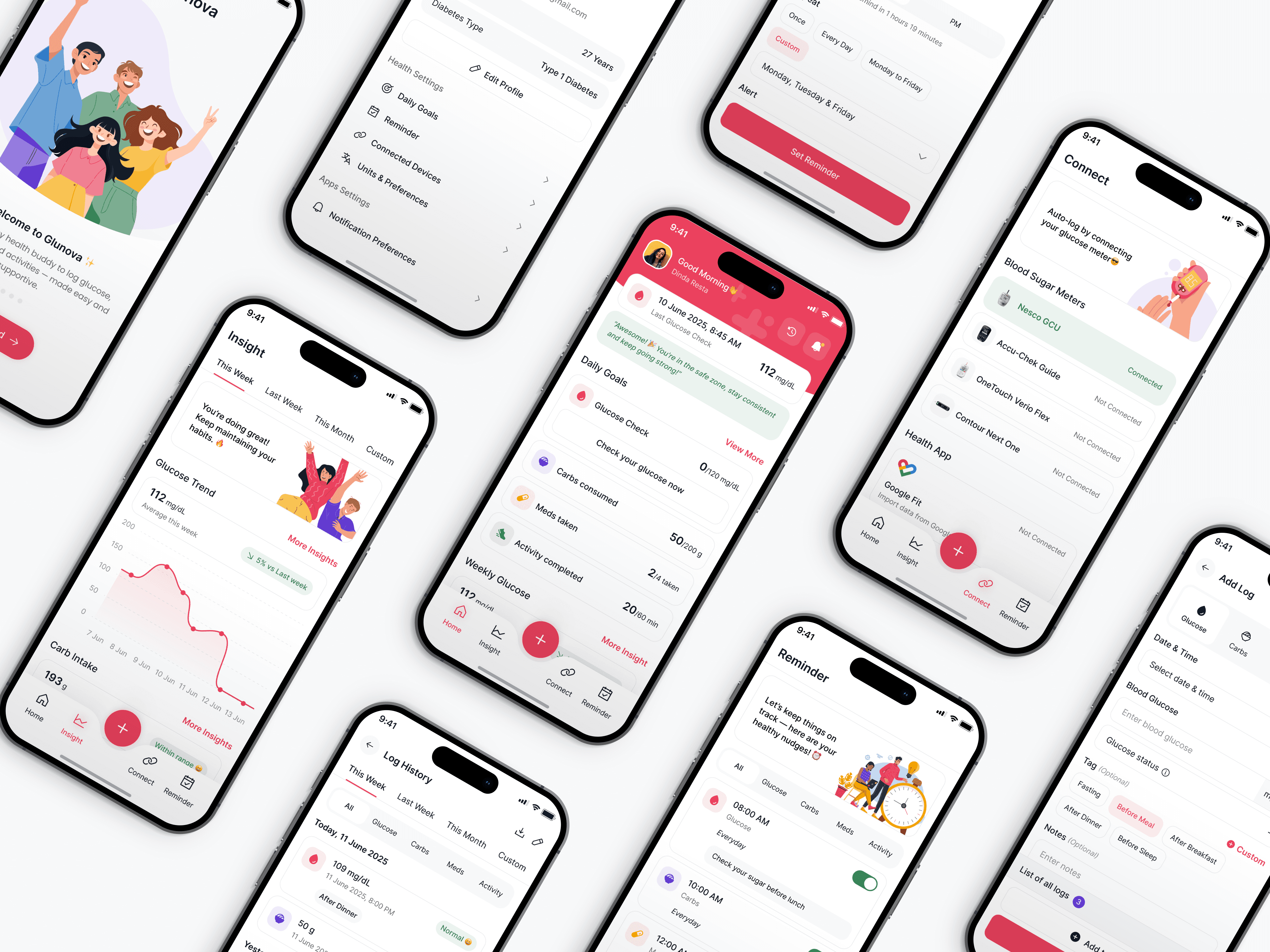
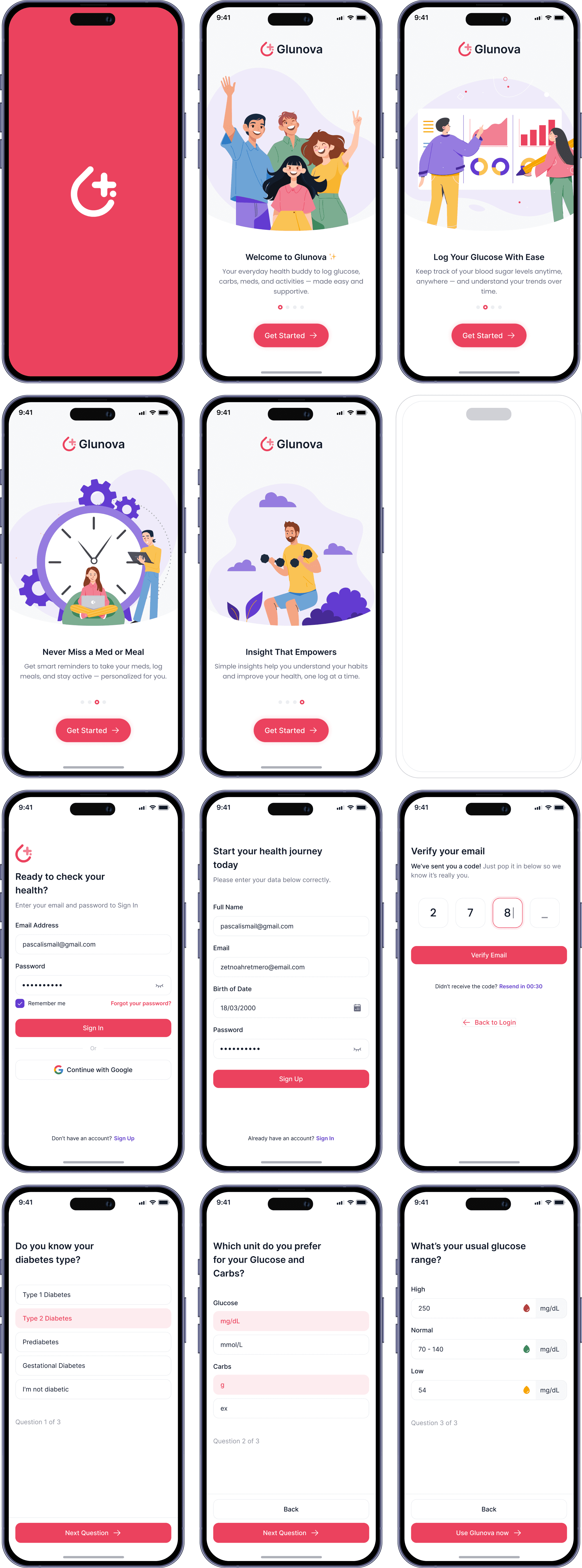
The onboarding screen appears when the app is first launched, introducing Glunova’s key features and benefits. It’s designed to be engaging and informative, helping users quickly understand the app’s purpose.
Homepage
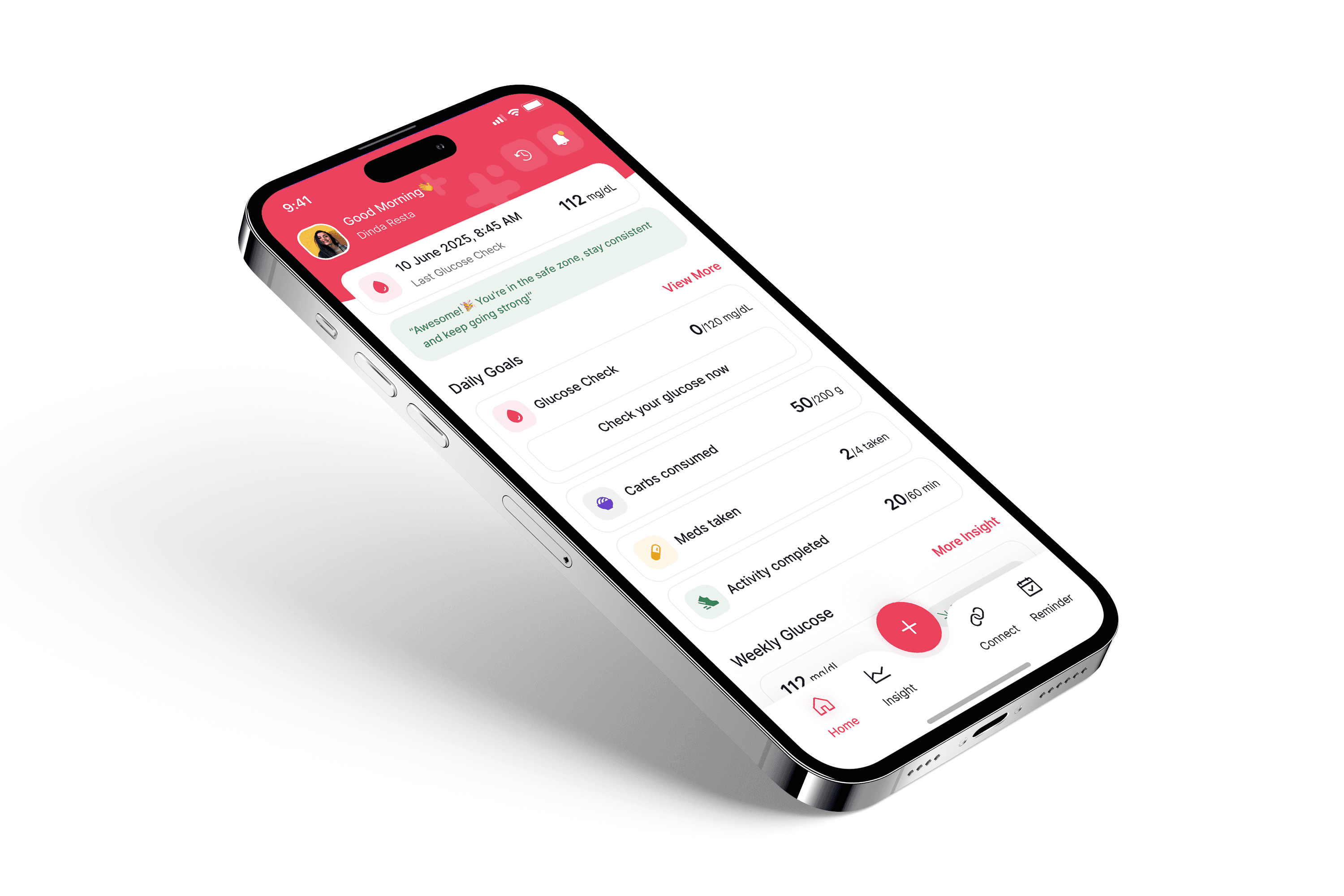
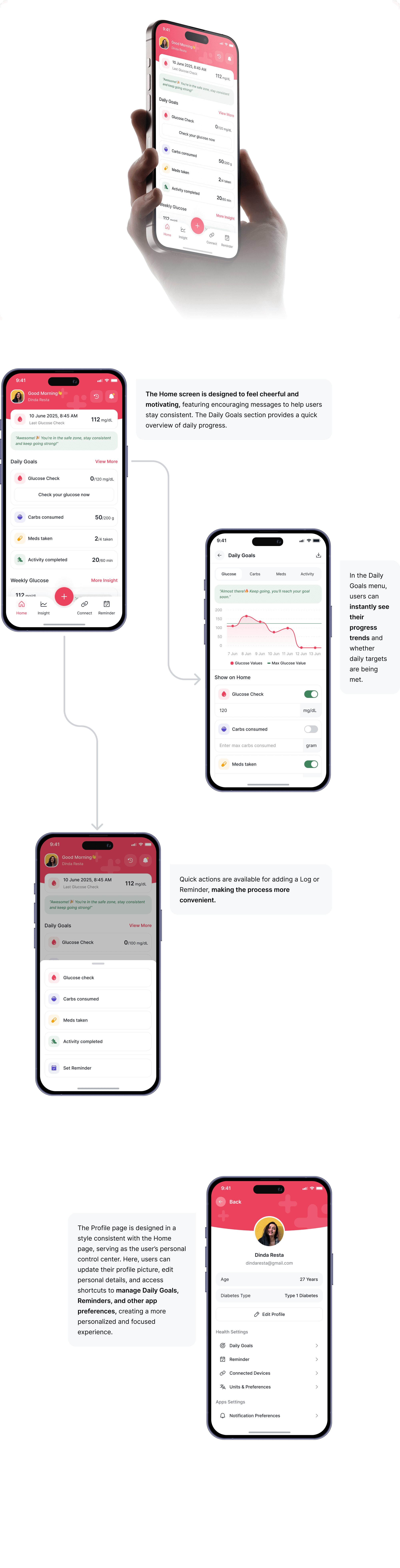
The Home screen is designed to deliver health information quickly and clearly. It includes summaries of Glucose, Meds, Activity, and consumed Carbs, a weekly progress graph, and the latest tracking history. All elements are arranged to help users monitor their health efficiently at a glance.
Add Log Menu
In the Add Log menu, users can record multiple types of logs at once, such as Glucose, Carbs, Activity, and Meds. This feature is designed to make logging faster and more efficient, especially for those who want to input several data points at the same time without navigating through separate menus or pages for each log type. This way, health tracking becomes more practical and less time-consuming.

Insight Menu
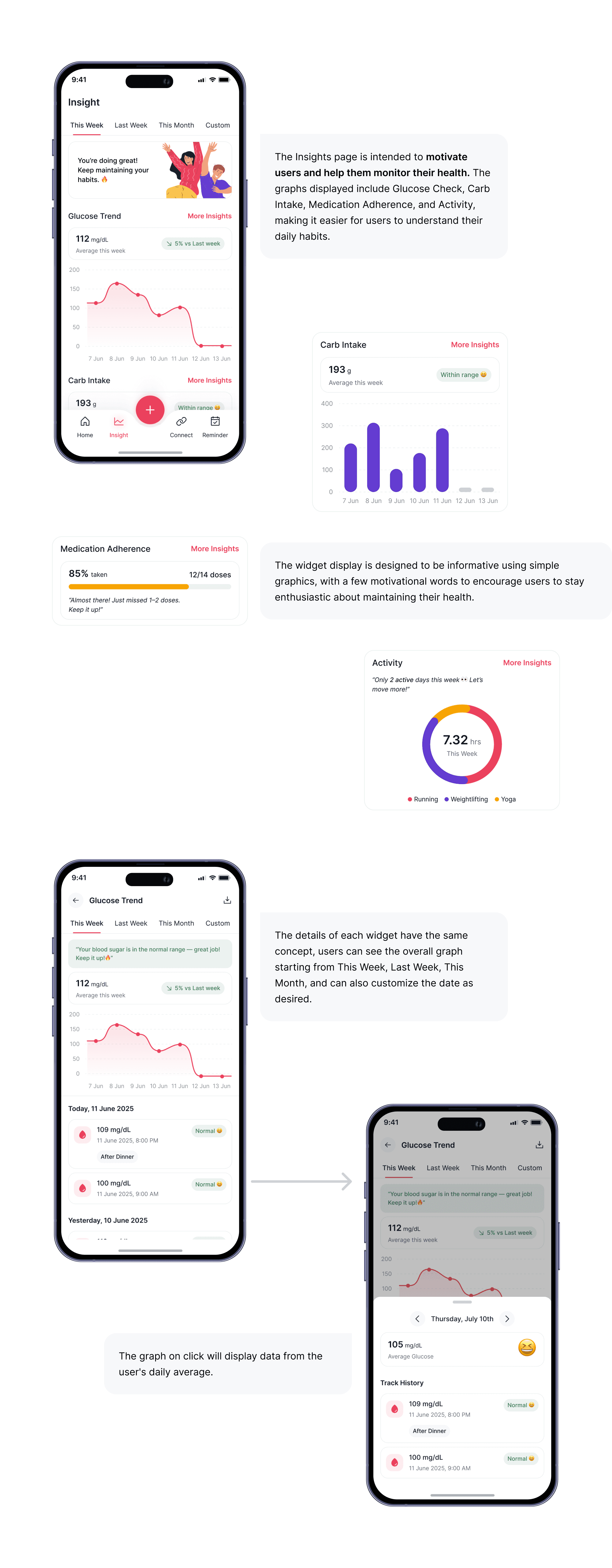
In the Insight menu, users can view a visual summary of all their tracking activities—such as blood glucose, food intake, medication, and physical activity. The data is displayed in clean and easy-to-read charts to help users monitor their health trends more holistically. Users can explore daily, weekly, or monthly averages and also customize the date range to suit their needs. This feature is designed to empower users to become more aware of their daily habits and make better, informed health decisions.
Connect to Device
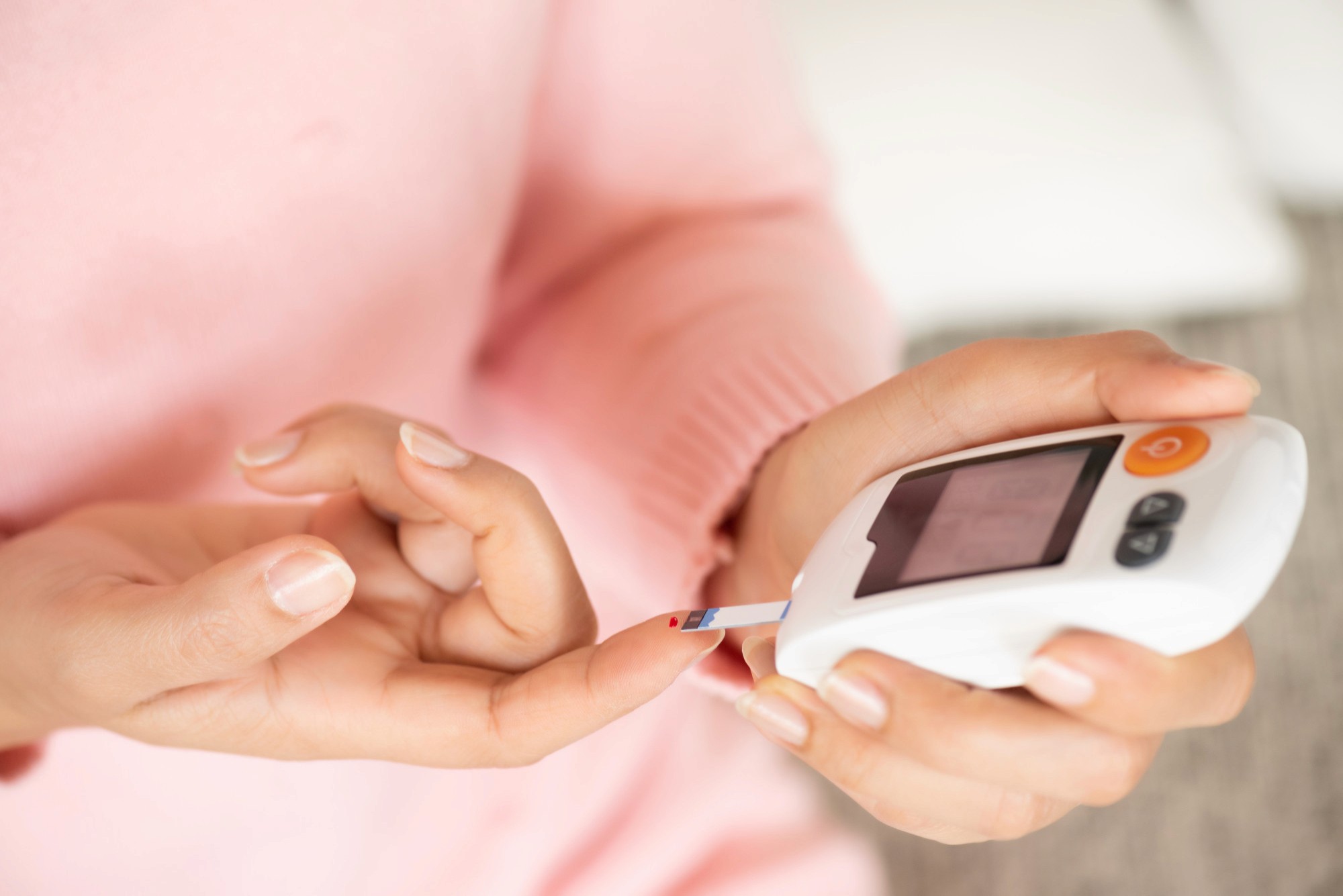
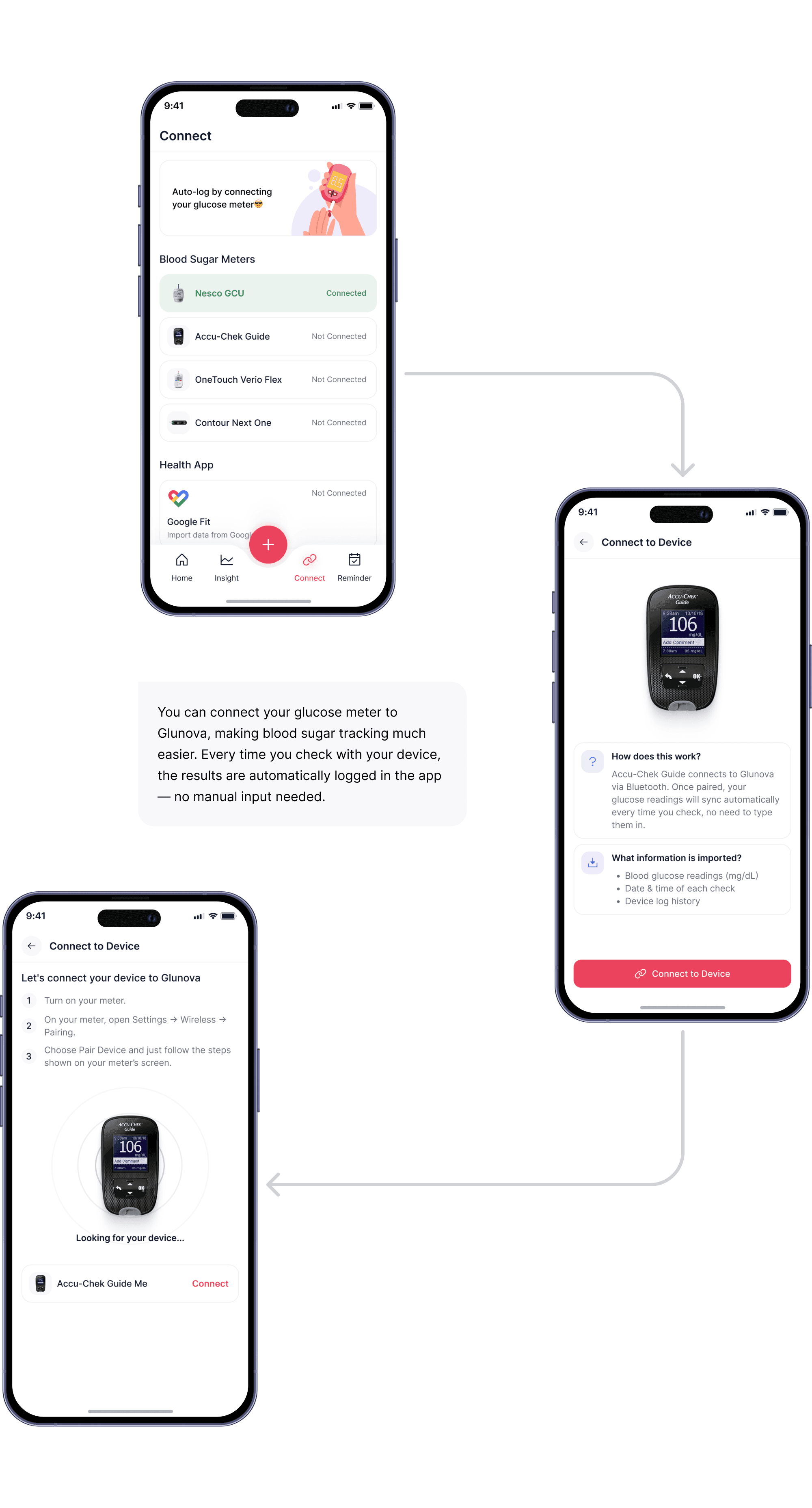
Designed to make blood sugar tracking easier by connecting your glucose meter to Glunova. Each time you check with your device, the results are automatically logged in the app.
Reminder Menu
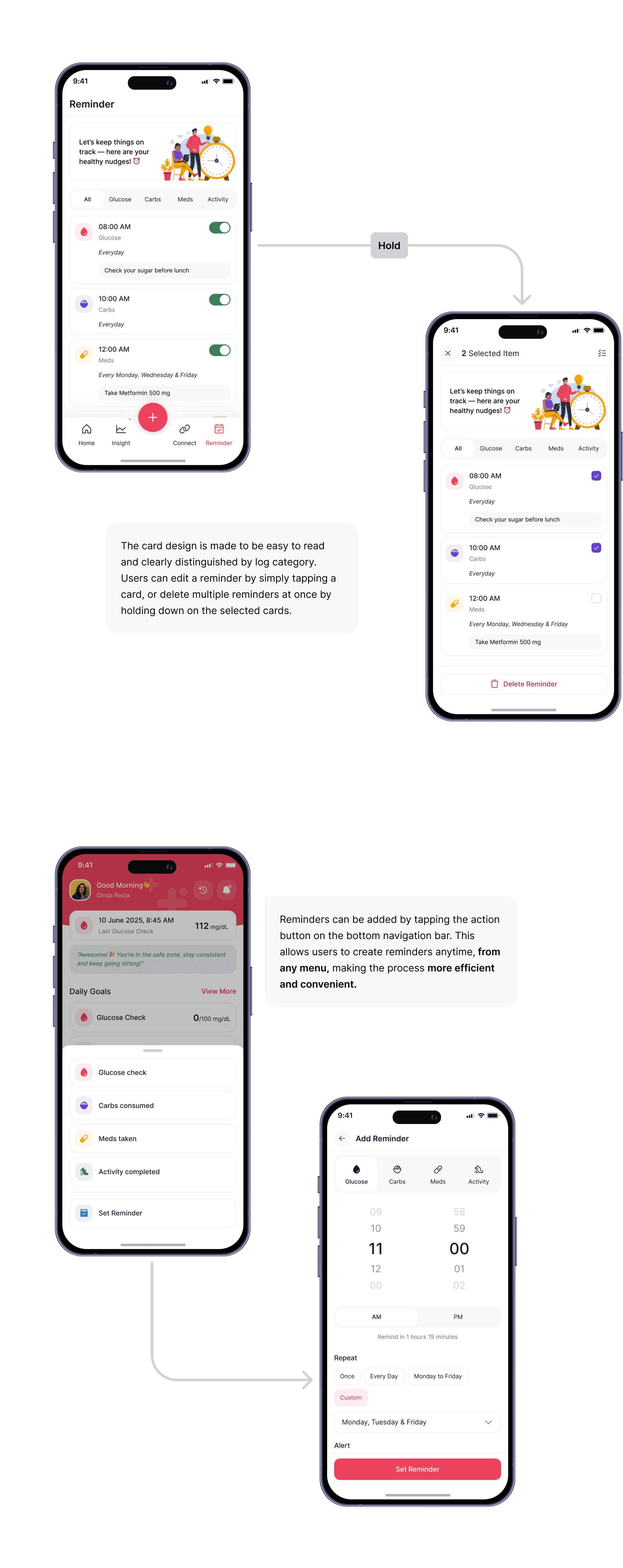
The Reminder page makes it easy for users to manage their health reminders — whether for glucose checks, medications, or daily activities. Users can add reminders by category, toggle them on or off anytime, and even delete multiple reminders at once by long-pressing the reminder cards. Everything is designed to help build healthier habits, one gentle nudge at a time.
History Menu
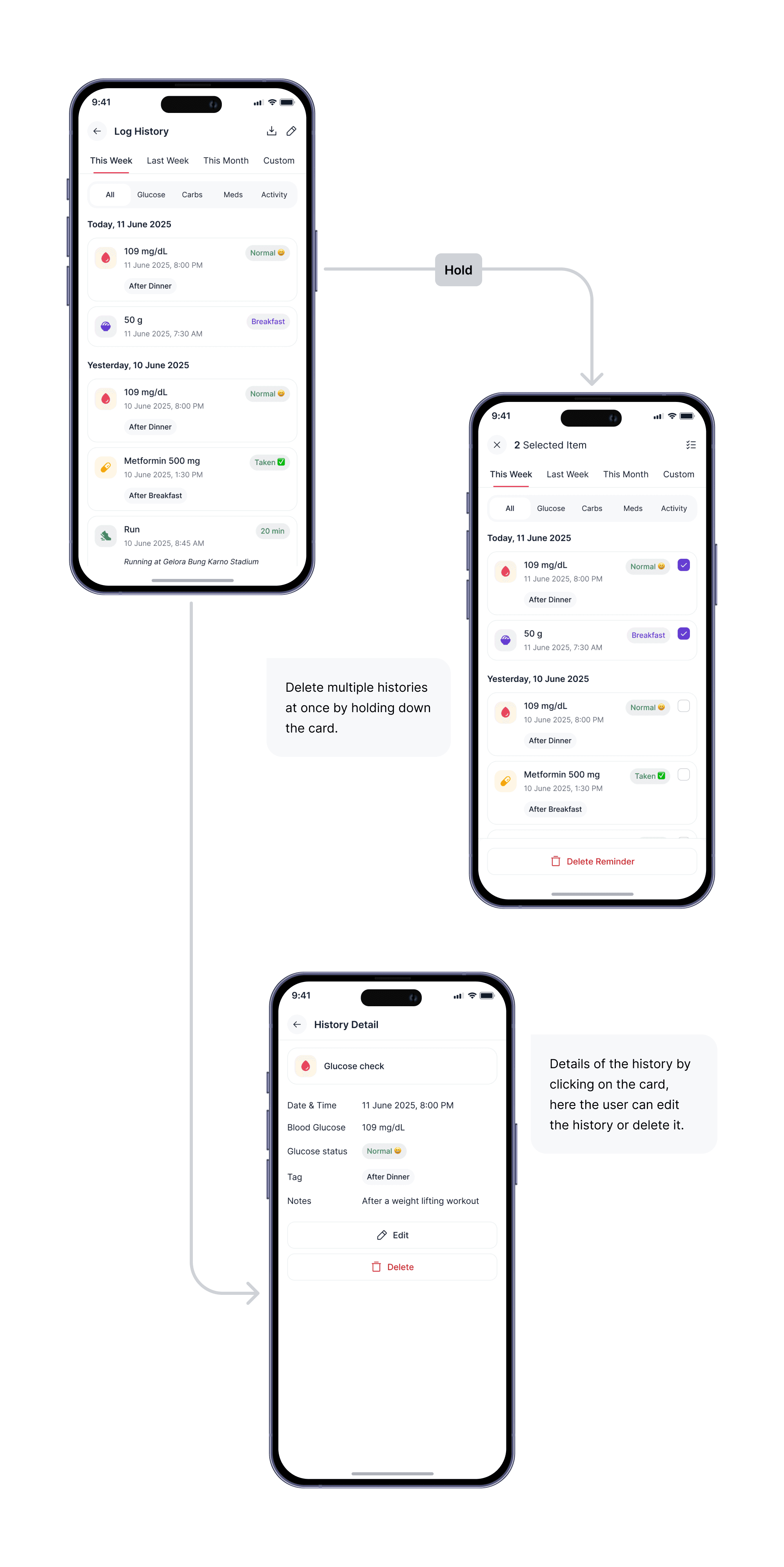
The History page helps users review their past logs — from glucose and meds to carbs and activity. Each entry can be viewed in detail, edited, or batch-deleted by holding selected cards. This gives users full control to keep their data clean, organized, and flexible.
Onboarding
The onboarding screen appears when the app is first launched, introducing Glunova’s key features and benefits. It’s designed to be engaging and informative, helping users quickly understand the app’s purpose.
Homepage
The Home screen is designed to deliver health information quickly and clearly. It includes summaries of Glucose, Meds, Activity, and consumed Carbs, a weekly progress graph, and the latest tracking history. All elements are arranged to help users monitor their health efficiently at a glance.
Add Log Menu
In the Add Log menu, users can record multiple types of logs at once, such as Glucose, Carbs, Activity, and Meds. This feature is designed to make logging faster and more efficient, especially for those who want to input several data points at the same time without navigating through separate menus or pages for each log type. This way, health tracking becomes more practical and less time-consuming.
Insight Menu
In the Insight menu, users can view a visual summary of all their tracking activities—such as blood glucose, food intake, medication, and physical activity. The data is displayed in clean and easy-to-read charts to help users monitor their health trends more holistically. Users can explore daily, weekly, or monthly averages and also customize the date range to suit their needs. This feature is designed to empower users to become more aware of their daily habits and make better, informed health decisions.
Connect to Device
Designed to make blood sugar tracking easier by connecting your glucose meter to Glunova. Each time you check with your device, the results are automatically logged in the app.
Reminder Menu
The Reminder page makes it easy for users to manage their health reminders — whether for glucose checks, medications, or daily activities. Users can add reminders by category, toggle them on or off anytime, and even delete multiple reminders at once by long-pressing the reminder cards. Everything is designed to help build healthier habits, one gentle nudge at a time.
History Menu
The History page helps users review their past logs — from glucose and meds to carbs and activity. Each entry can be viewed in detail, edited, or batch-deleted by holding selected cards. This gives users full control to keep their data clean, organized, and flexible.
Onboarding
The onboarding screen appears when the app is first launched, introducing Glunova’s key features and benefits. It’s designed to be engaging and informative, helping users quickly understand the app’s purpose.
Homepage
The Home screen is designed to deliver health information quickly and clearly. It includes summaries of Glucose, Meds, Activity, and consumed Carbs, a weekly progress graph, and the latest tracking history. All elements are arranged to help users monitor their health efficiently at a glance.
Add Log Menu
In the Add Log menu, users can record multiple types of logs at once, such as Glucose, Carbs, Activity, and Meds. This feature is designed to make logging faster and more efficient, especially for those who want to input several data points at the same time without navigating through separate menus or pages for each log type. This way, health tracking becomes more practical and less time-consuming.
Insight Menu
In the Insight menu, users can view a visual summary of all their tracking activities—such as blood glucose, food intake, medication, and physical activity. The data is displayed in clean and easy-to-read charts to help users monitor their health trends more holistically. Users can explore daily, weekly, or monthly averages and also customize the date range to suit their needs. This feature is designed to empower users to become more aware of their daily habits and make better, informed health decisions.
Connect to Device
Designed to make blood sugar tracking easier by connecting your glucose meter to Glunova. Each time you check with your device, the results are automatically logged in the app.
Reminder Menu
The Reminder page makes it easy for users to manage their health reminders — whether for glucose checks, medications, or daily activities. Users can add reminders by category, toggle them on or off anytime, and even delete multiple reminders at once by long-pressing the reminder cards. Everything is designed to help build healthier habits, one gentle nudge at a time.
History Menu
The History page helps users review their past logs — from glucose and meds to carbs and activity. Each entry can be viewed in detail, edited, or batch-deleted by holding selected cards. This gives users full control to keep their data clean, organized, and flexible.
Results & Reflection
Results & Reflection
Results & Reflection
🔥 What I Achieved
I successfully designed Glunova as a user-friendly diabetes tracking app that helps users monitor their glucose levels, medication intake, meals, and daily activities. The clean UI and thoughtful user flow make it accessible for a wide range of users, from teens to older adults. The flexible logging system allows multiple entries at once, making health tracking simpler and more efficient.
💡 What I Learned
Throughout the process, I gained deeper insight into how important personalization is in health apps. Users have various types of medications and different physical activities, which made me realize the importance of designing for flexibility. I also learned that integrating hardware (like glucometers) could provide a smoother and more seamless experience for users who regularly monitor their glucose.
🍀 What Could Be Improved
One area that could be improved is the ability to log medications and activities in a more detailed way. Since there are so many different types of medications and activities, it would be helpful to allow users to add or choose more specific options.
🔥 What I Achieved
I successfully designed Glunova as a user-friendly diabetes tracking app that helps users monitor their glucose levels, medication intake, meals, and daily activities. The clean UI and thoughtful user flow make it accessible for a wide range of users, from teens to older adults. The flexible logging system allows multiple entries at once, making health tracking simpler and more efficient.
💡 What I Learned
Throughout the process, I gained deeper insight into how important personalization is in health apps. Users have various types of medications and different physical activities, which made me realize the importance of designing for flexibility. I also learned that integrating hardware (like glucometers) could provide a smoother and more seamless experience for users who regularly monitor their glucose.
🍀 What Could Be Improved
One area that could be improved is the ability to log medications and activities in a more detailed way. Since there are so many different types of medications and activities, it would be helpful to allow users to add or choose more specific options.
🔥 What I Achieved
I successfully designed Glunova as a user-friendly diabetes tracking app that helps users monitor their glucose levels, medication intake, meals, and daily activities. The clean UI and thoughtful user flow make it accessible for a wide range of users, from teens to older adults. The flexible logging system allows multiple entries at once, making health tracking simpler and more efficient.
💡 What I Learned
Throughout the process, I gained deeper insight into how important personalization is in health apps. Users have various types of medications and different physical activities, which made me realize the importance of designing for flexibility. I also learned that integrating hardware (like glucometers) could provide a smoother and more seamless experience for users who regularly monitor their glucose.
🍀 What Could Be Improved
One area that could be improved is the ability to log medications and activities in a more detailed way. Since there are so many different types of medications and activities, it would be helpful to allow users to add or choose more specific options.