Modular ERP App for UMKM: Inventory, Sales & Finance Management
Category
Case Study
Category
Case Study
Category
Case Study
Industry
Tech
Industry
Tech
Industry
Tech
Date
Jun 15, 2025
Date
Jun 15, 2025
Date
Jun 15, 2025
Team
Solo
Team
Solo
Team
Solo
Project Overview
Project Overview
Project Overview
Empowering Small Businesses: Redefining ERP Experience for Modern SMEs
In an era where operational efficiency and digital simplicity are essential for business growth, this ERP system was designed specifically for small and medium-sized enterprises (SMEs) to unify key business functions—such as inventory, sales, purchasing, finance, and employee management—into a single, intuitive platform. With many SMEs still relying on manual processes or fragmented tools, this solution offers a smarter, more accessible alternative tailored to their real needs. The design process focused on simplifying complex workflows through user-centered design, ensuring the interface remains clean, modern, and easy to navigate for users with varying levels of tech literacy. This case study highlights the journey of creating a purpose-driven ERP experience that bridges traditional business practices with modern digital tools.
Problem Statement
Many SMEs still rely on manual record-keeping or disconnected tools to run daily operations. This often leads to inefficiencies, data loss, inventory issues, and lack of financial visibility. Business owners struggle to get a real-time overview of their operations, and staff often find existing digital tools too complex or intimidating to use.
Goals & Challenges
🎯 Goals
Provide an intuitive and simplified ERP experience for non-tech-savvy business users.
Unify multiple business processes (inventory, sales, finance, HR) into one system.
Help business owners make informed decisions with dashboards and real-time data.
🥶 Challenges
Designing a complex system that remains easy to use.
Balancing functional depth with visual simplicity.
Adapting features to local business behaviors and workflows (e.g., manual transactions, informal record-keeping).
Empowering Small Businesses: Redefining ERP Experience for Modern SMEs
In an era where operational efficiency and digital simplicity are essential for business growth, this ERP system was designed specifically for small and medium-sized enterprises (SMEs) to unify key business functions—such as inventory, sales, purchasing, finance, and employee management—into a single, intuitive platform. With many SMEs still relying on manual processes or fragmented tools, this solution offers a smarter, more accessible alternative tailored to their real needs. The design process focused on simplifying complex workflows through user-centered design, ensuring the interface remains clean, modern, and easy to navigate for users with varying levels of tech literacy. This case study highlights the journey of creating a purpose-driven ERP experience that bridges traditional business practices with modern digital tools.
Problem Statement
Many SMEs still rely on manual record-keeping or disconnected tools to run daily operations. This often leads to inefficiencies, data loss, inventory issues, and lack of financial visibility. Business owners struggle to get a real-time overview of their operations, and staff often find existing digital tools too complex or intimidating to use.
Goals & Challenges
🎯 Goals
Provide an intuitive and simplified ERP experience for non-tech-savvy business users.
Unify multiple business processes (inventory, sales, finance, HR) into one system.
Help business owners make informed decisions with dashboards and real-time data.
🥶 Challenges
Designing a complex system that remains easy to use.
Balancing functional depth with visual simplicity.
Adapting features to local business behaviors and workflows (e.g., manual transactions, informal record-keeping).
Empowering Small Businesses: Redefining ERP Experience for Modern SMEs
In an era where operational efficiency and digital simplicity are essential for business growth, this ERP system was designed specifically for small and medium-sized enterprises (SMEs) to unify key business functions—such as inventory, sales, purchasing, finance, and employee management—into a single, intuitive platform. With many SMEs still relying on manual processes or fragmented tools, this solution offers a smarter, more accessible alternative tailored to their real needs. The design process focused on simplifying complex workflows through user-centered design, ensuring the interface remains clean, modern, and easy to navigate for users with varying levels of tech literacy. This case study highlights the journey of creating a purpose-driven ERP experience that bridges traditional business practices with modern digital tools.
Problem Statement
Many SMEs still rely on manual record-keeping or disconnected tools to run daily operations. This often leads to inefficiencies, data loss, inventory issues, and lack of financial visibility. Business owners struggle to get a real-time overview of their operations, and staff often find existing digital tools too complex or intimidating to use.
Goals & Challenges
🎯 Goals
Provide an intuitive and simplified ERP experience for non-tech-savvy business users.
Unify multiple business processes (inventory, sales, finance, HR) into one system.
Help business owners make informed decisions with dashboards and real-time data.
🥶 Challenges
Designing a complex system that remains easy to use.
Balancing functional depth with visual simplicity.
Adapting features to local business behaviors and workflows (e.g., manual transactions, informal record-keeping).
Design Process
Design Process
Design Process
Initial Problem Understanding
Through intuitive navigation, a clean UI, and a mobile-first approach, we enhanced usability and boosted conversions. The redesign led to a measurable increase in sales and customer retention, with users reporting a smoother and more enjoyable shopping experience.
User Understanding
Primary users identified include:
Business owners who need high-level overviews and reports
Cashiers or store staff who input transactions and manage inventory
Admin/Finance roles who track expenses and salary schedules
Pain Point
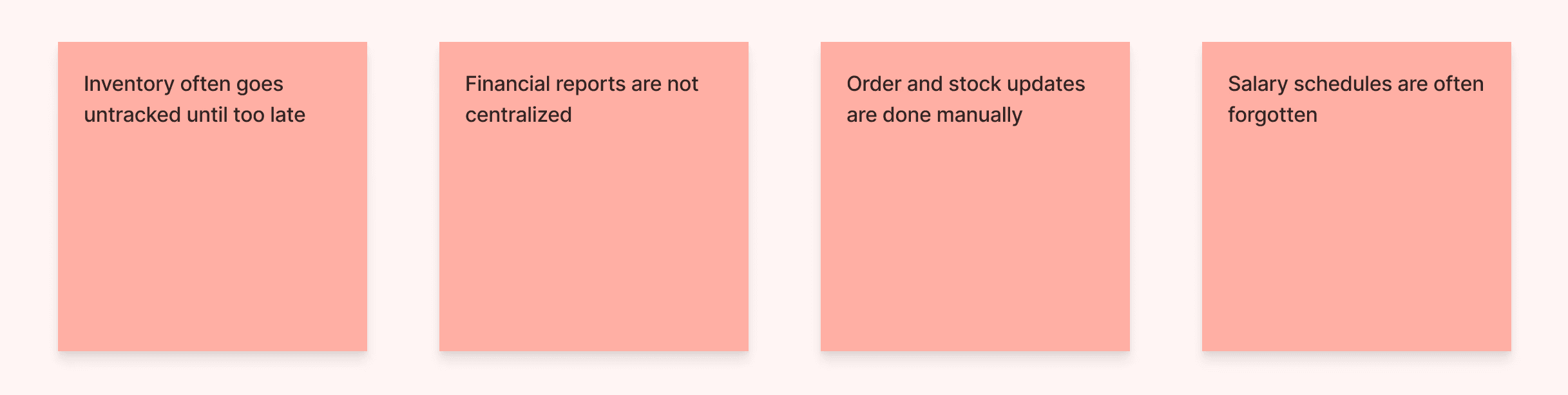
Identifying real-world challenges faced by SME owners when managing business operations manually. These friction points often arise from disconnected systems, limited visibility, and lack of automation—ultimately affecting efficiency, accuracy, and growth potential.
Solution Idea
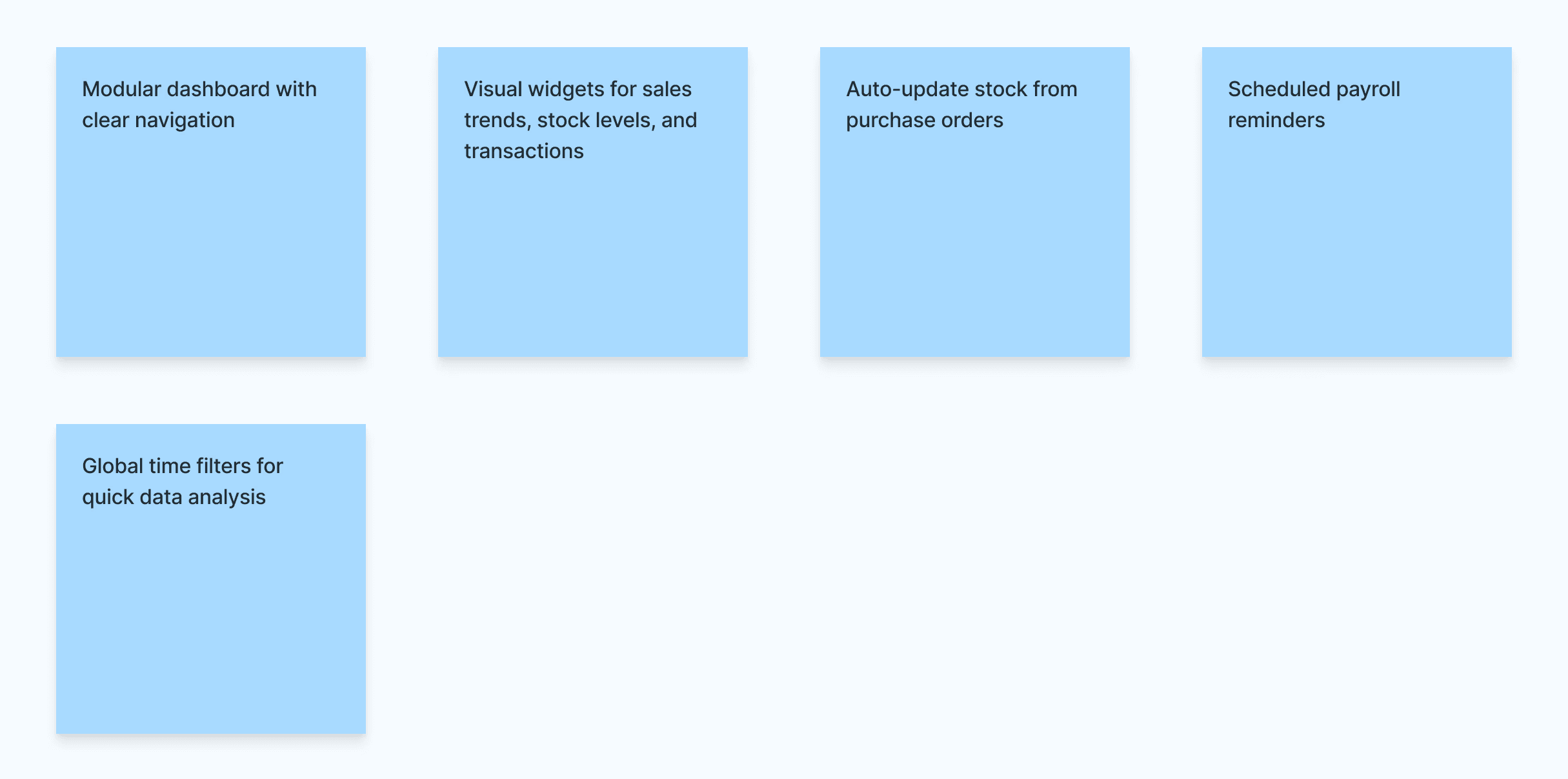
To turn those challenges into opportunities, we designed a modular ERP system that simplifies daily operations through automation, clean UI, and contextual insights—empowering small business owners to work smarter, not harder.
Information Architecture
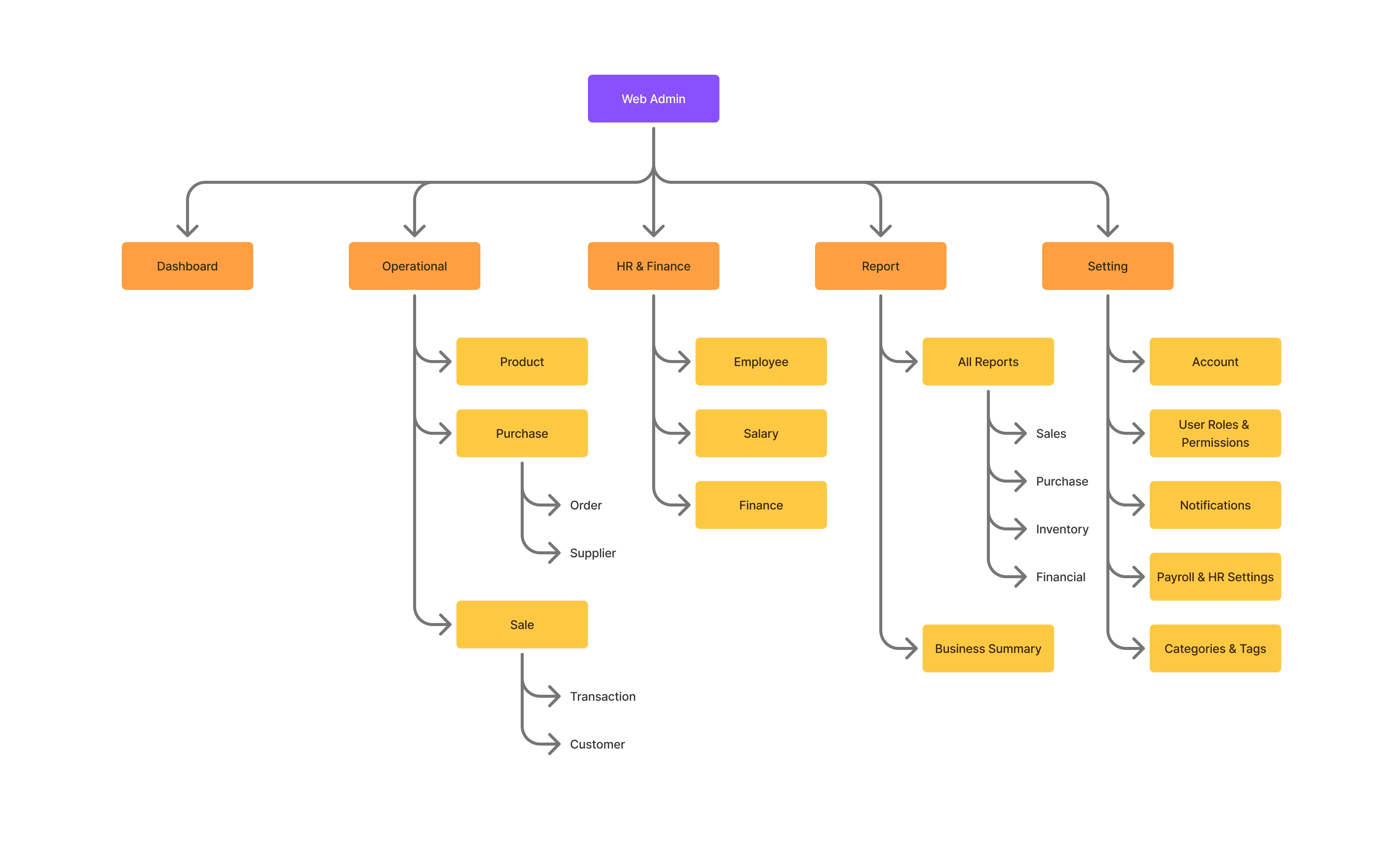
The information architecture is structured to provide a clear, modular, and user-friendly experience for managing key aspects of business operations. Designed specifically for SMEs, it ensures users can seamlessly navigate through inventory, sales, purchasing, finance, and employee management—without feeling overwhelmed.
Each module is logically grouped and interconnected, allowing users to complete daily tasks efficiently while maintaining full visibility across business processes. From product tracking to financial reports, the system architecture supports streamlined workflows and intuitive access to critical data.
Initial Problem Understanding
Through intuitive navigation, a clean UI, and a mobile-first approach, we enhanced usability and boosted conversions. The redesign led to a measurable increase in sales and customer retention, with users reporting a smoother and more enjoyable shopping experience.
User Understanding
Primary users identified include:
Business owners who need high-level overviews and reports
Cashiers or store staff who input transactions and manage inventory
Admin/Finance roles who track expenses and salary schedules
Pain Point
Identifying real-world challenges faced by SME owners when managing business operations manually. These friction points often arise from disconnected systems, limited visibility, and lack of automation—ultimately affecting efficiency, accuracy, and growth potential.
Solution Idea
To turn those challenges into opportunities, we designed a modular ERP system that simplifies daily operations through automation, clean UI, and contextual insights—empowering small business owners to work smarter, not harder.
Information Architecture
The information architecture is structured to provide a clear, modular, and user-friendly experience for managing key aspects of business operations. Designed specifically for SMEs, it ensures users can seamlessly navigate through inventory, sales, purchasing, finance, and employee management—without feeling overwhelmed.
Each module is logically grouped and interconnected, allowing users to complete daily tasks efficiently while maintaining full visibility across business processes. From product tracking to financial reports, the system architecture supports streamlined workflows and intuitive access to critical data.
Initial Problem Understanding
Through intuitive navigation, a clean UI, and a mobile-first approach, we enhanced usability and boosted conversions. The redesign led to a measurable increase in sales and customer retention, with users reporting a smoother and more enjoyable shopping experience.
User Understanding
Primary users identified include:
Business owners who need high-level overviews and reports
Cashiers or store staff who input transactions and manage inventory
Admin/Finance roles who track expenses and salary schedules
Pain Point
Identifying real-world challenges faced by SME owners when managing business operations manually. These friction points often arise from disconnected systems, limited visibility, and lack of automation—ultimately affecting efficiency, accuracy, and growth potential.
Solution Idea
To turn those challenges into opportunities, we designed a modular ERP system that simplifies daily operations through automation, clean UI, and contextual insights—empowering small business owners to work smarter, not harder.
Information Architecture
The information architecture is structured to provide a clear, modular, and user-friendly experience for managing key aspects of business operations. Designed specifically for SMEs, it ensures users can seamlessly navigate through inventory, sales, purchasing, finance, and employee management—without feeling overwhelmed.
Each module is logically grouped and interconnected, allowing users to complete daily tasks efficiently while maintaining full visibility across business processes. From product tracking to financial reports, the system architecture supports streamlined workflows and intuitive access to critical data.
High Fidelity Design
High Fidelity Design
High Fidelity Design
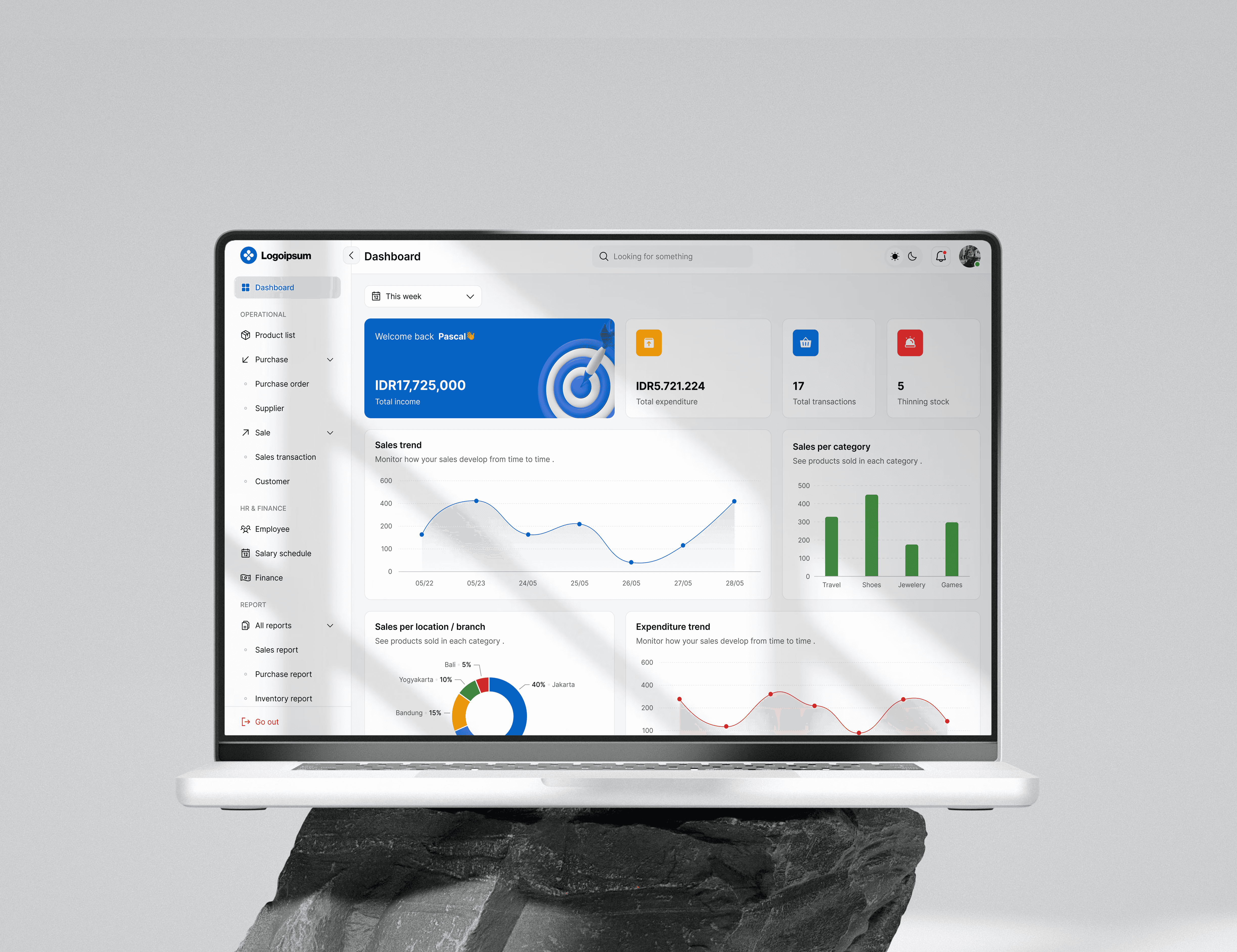
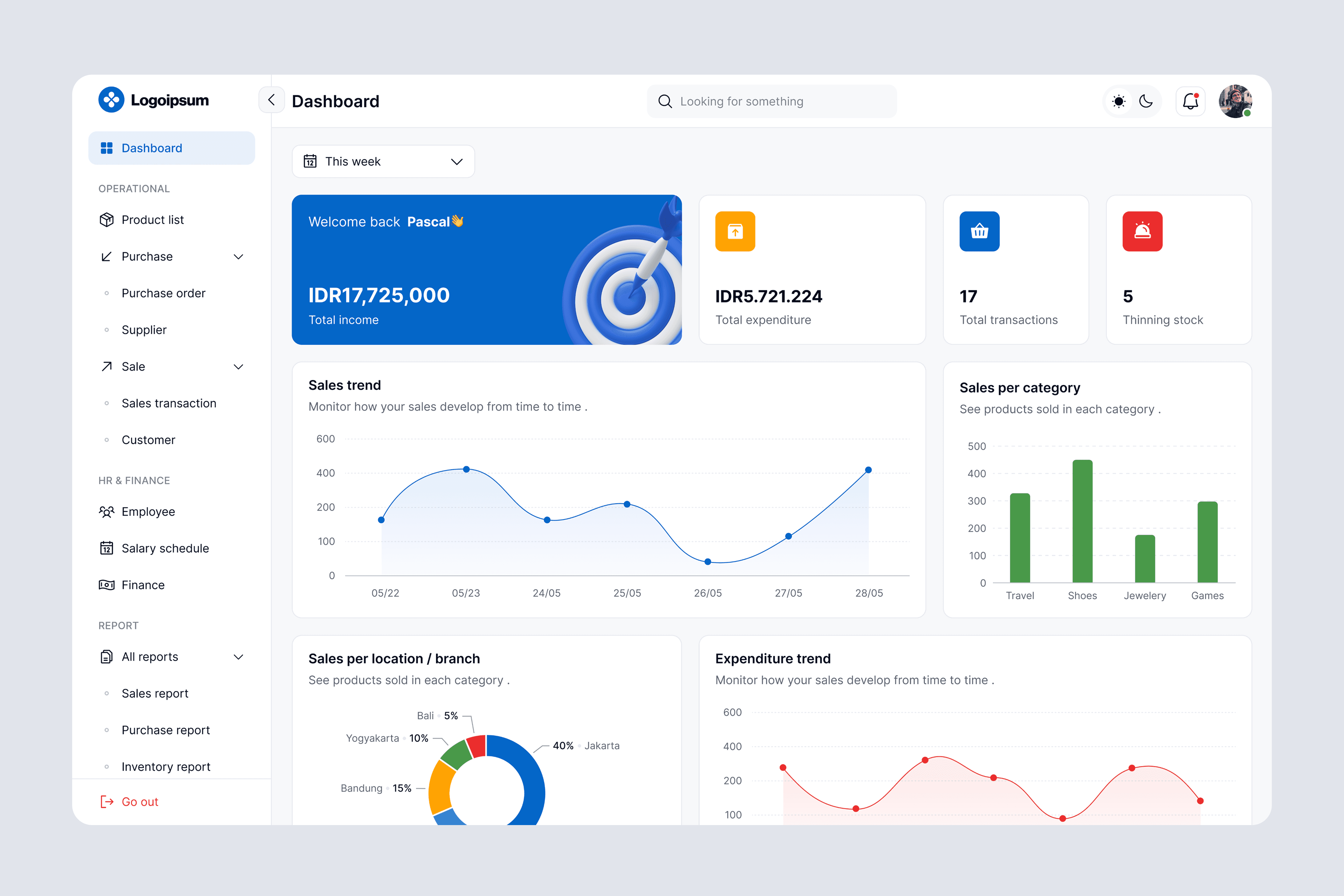
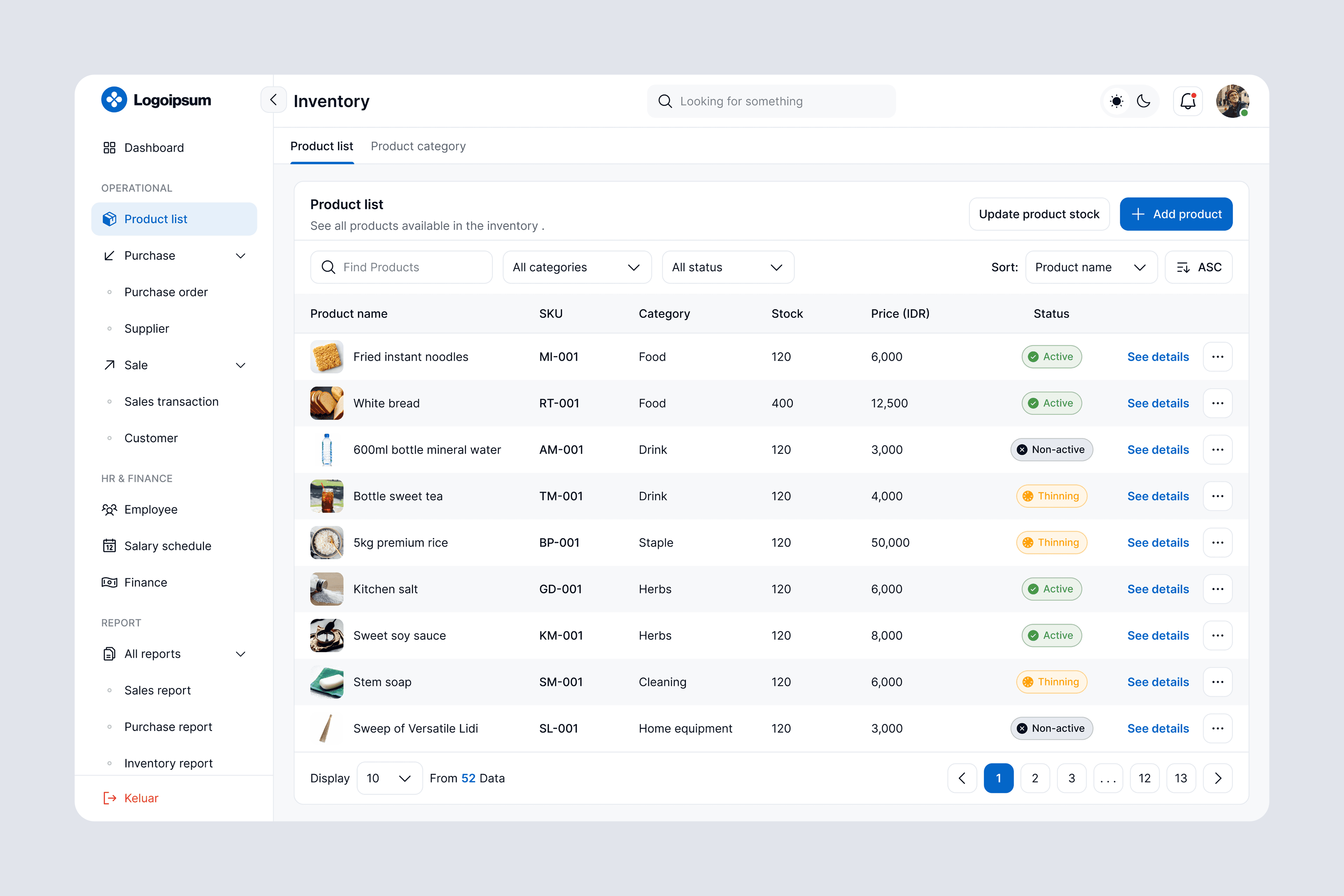
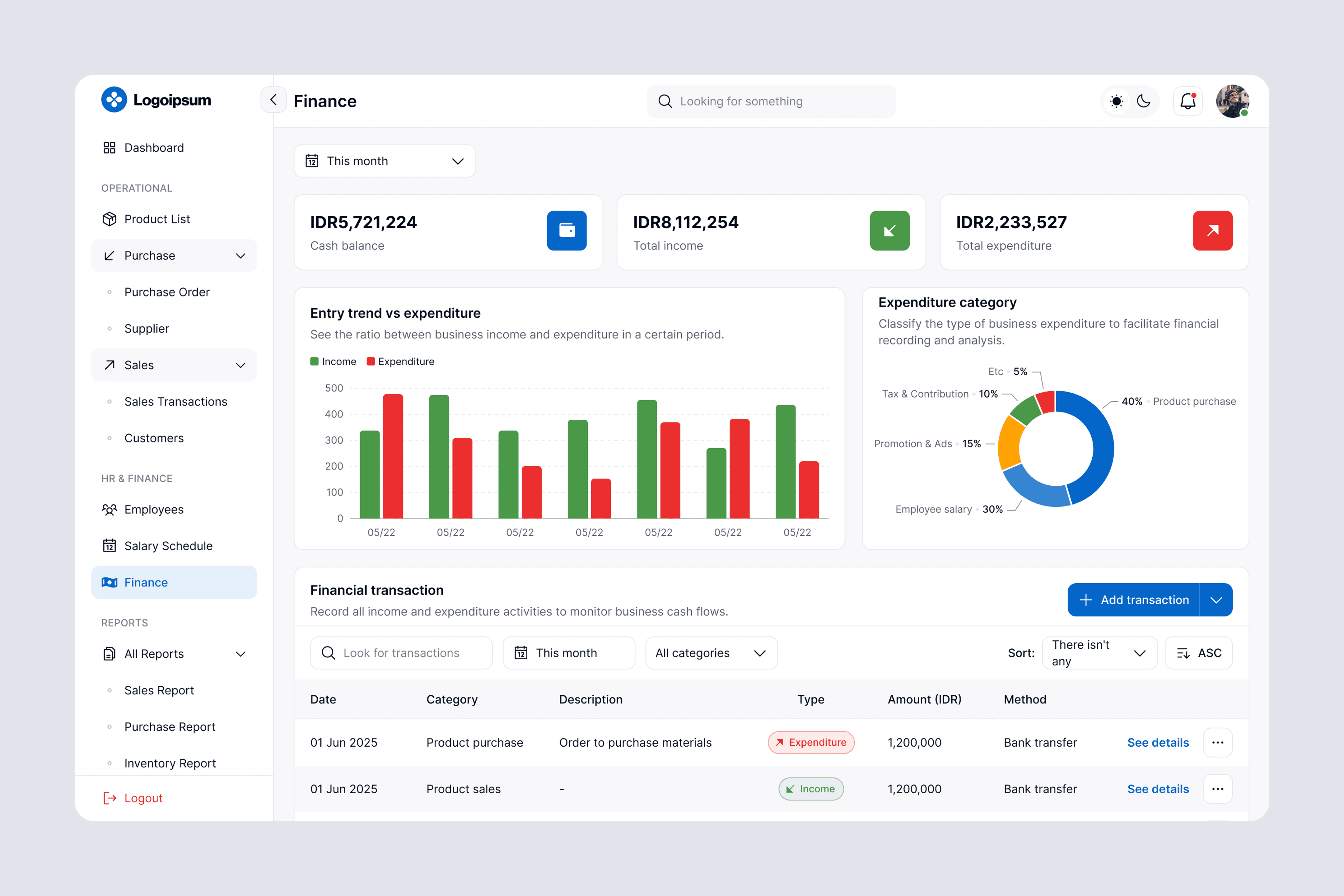
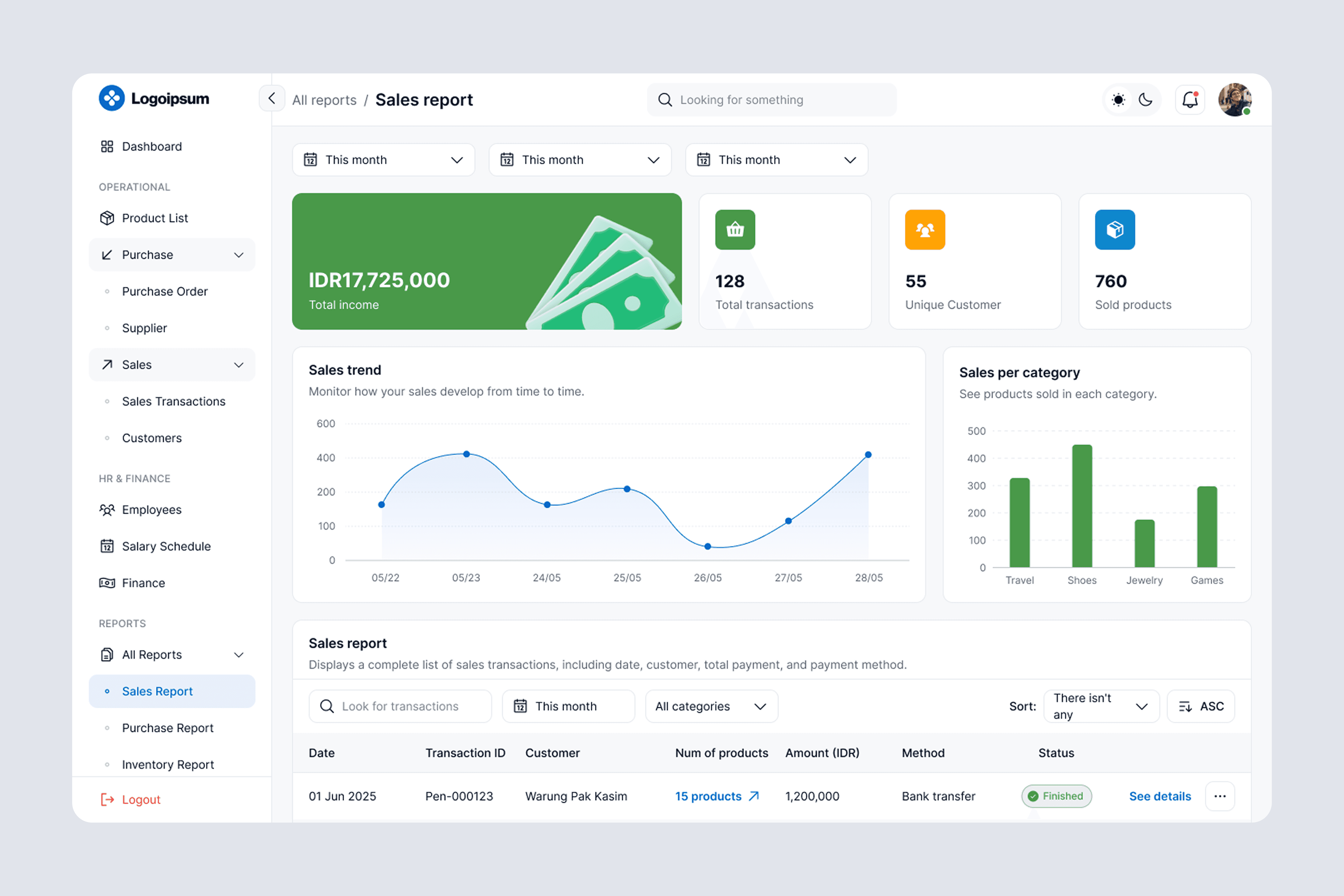
The Web Admin interface is designed to give users intuitive control over everyday business operations. With a clean, responsive layout, users can easily track key metrics like stock levels, recent transactions, sales performance, and financial activity.
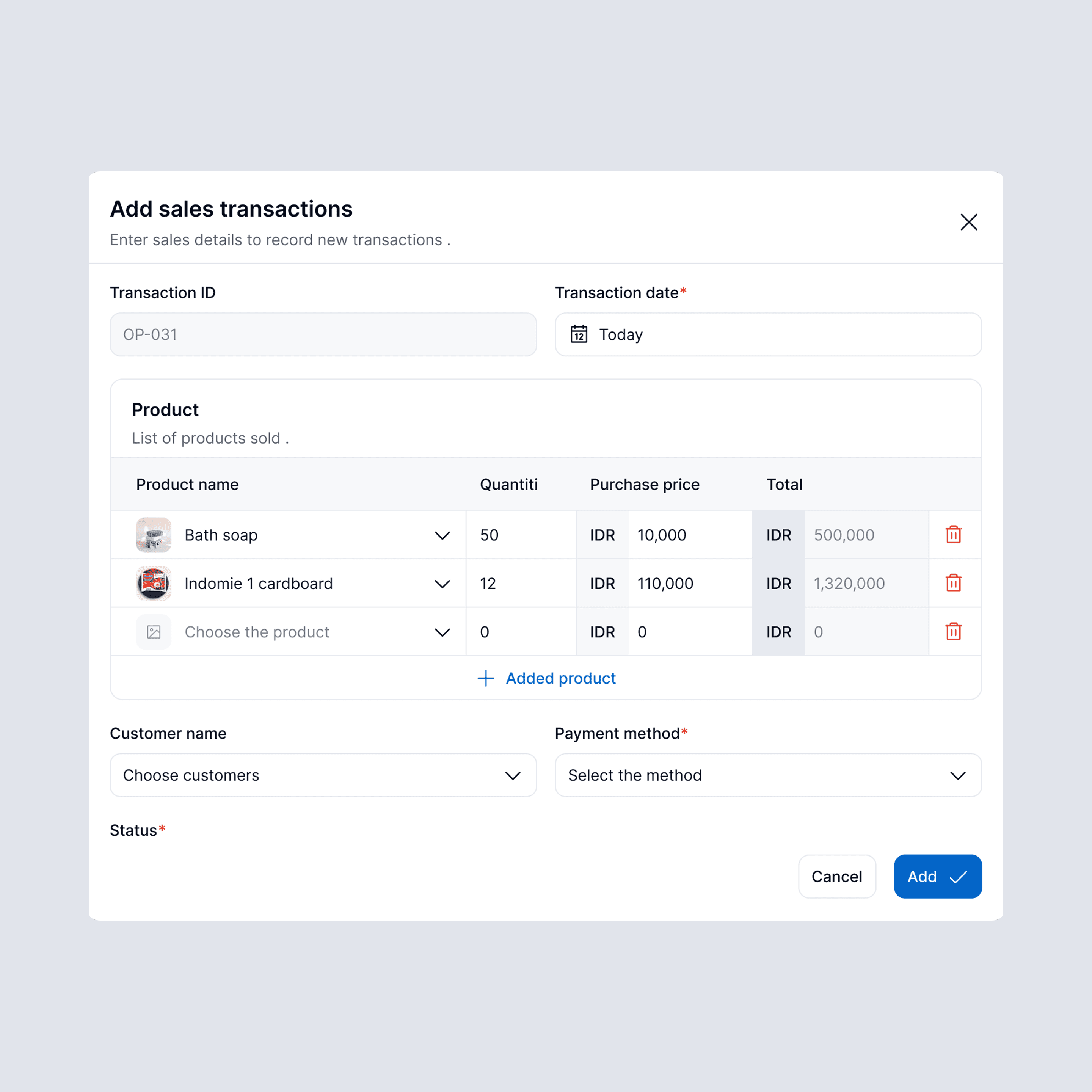
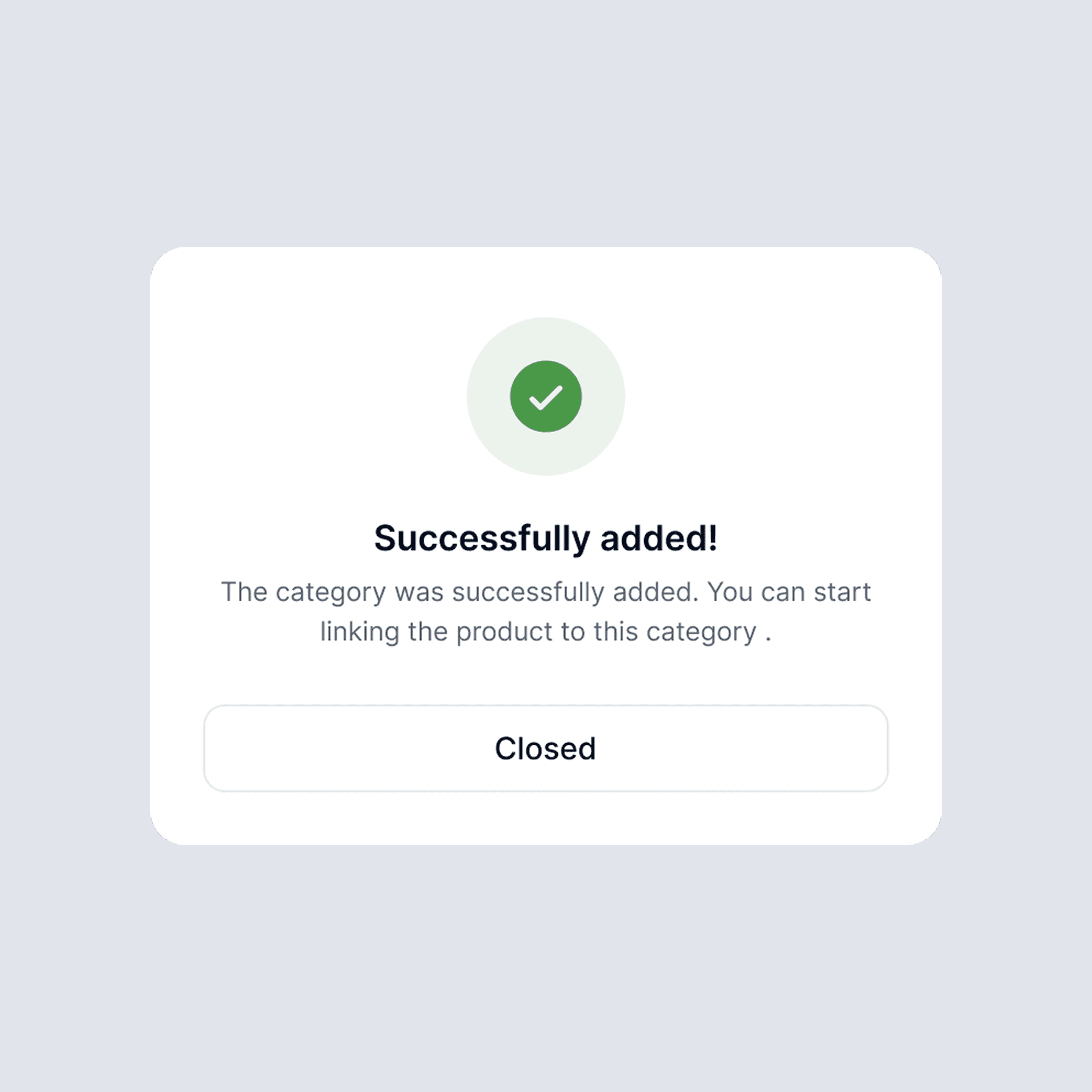
Each module—from inventory and purchasing to HR and finance—is built for efficiency, featuring real-time updates and interactive charts. Users can quickly add, edit, or manage records without friction, keeping all data accurate and up to date. This system not only improves operational flow but also supports smarter business decisions through clear and actionable insights.
Results & Reflection
Results & Reflection
Results & Reflection
🔥 What I Achieved
Through this project, I was able to design a complete ERP system tailored specifically for small and medium-sized businesses. Even though the data used is dummy, the flow and structure are built to reflect real business operations—making it easier for stakeholders to imagine how the system could actually help them work more efficiently.
💡 What I Learned
Working on this taught me how crucial it is to balance rich functionality with simplicity. I had to constantly put myself in the shoes of local store owners and employees who might not be familiar with techy systems. It pushed me to think deeper about layout, wording, and how to make the experience smooth without overwhelming the user.
🍀 What Could Be Improved
If I were to continue this project, I’d love to take it a step further by:
Testing it with real users from SMEs to validate the usability
Adding deeper business insights, like profit tracking or sales trends
Designing a mobile version for daily use on the go
Supporting more languages to reach a broader audience
🔥 What I Achieved
Through this project, I was able to design a complete ERP system tailored specifically for small and medium-sized businesses. Even though the data used is dummy, the flow and structure are built to reflect real business operations—making it easier for stakeholders to imagine how the system could actually help them work more efficiently.
💡 What I Learned
Working on this taught me how crucial it is to balance rich functionality with simplicity. I had to constantly put myself in the shoes of local store owners and employees who might not be familiar with techy systems. It pushed me to think deeper about layout, wording, and how to make the experience smooth without overwhelming the user.
🍀 What Could Be Improved
If I were to continue this project, I’d love to take it a step further by:
Testing it with real users from SMEs to validate the usability
Adding deeper business insights, like profit tracking or sales trends
Designing a mobile version for daily use on the go
Supporting more languages to reach a broader audience
🔥 What I Achieved
Through this project, I was able to design a complete ERP system tailored specifically for small and medium-sized businesses. Even though the data used is dummy, the flow and structure are built to reflect real business operations—making it easier for stakeholders to imagine how the system could actually help them work more efficiently.
💡 What I Learned
Working on this taught me how crucial it is to balance rich functionality with simplicity. I had to constantly put myself in the shoes of local store owners and employees who might not be familiar with techy systems. It pushed me to think deeper about layout, wording, and how to make the experience smooth without overwhelming the user.
🍀 What Could Be Improved
If I were to continue this project, I’d love to take it a step further by:
Testing it with real users from SMEs to validate the usability
Adding deeper business insights, like profit tracking or sales trends
Designing a mobile version for daily use on the go
Supporting more languages to reach a broader audience